13+ Best Fonts for Resumes to Use in 2026 + Formatting Tips

Your resume has seconds to make an impression, and the wrong font can make even the strongest resume hard to read. Whether you're creating your first resume or updating an existing one, choosing the right typography is a simple yet powerful way to make a professional impression.
The best resume fonts balance readability with modern aesthetics, ensuring your qualifications shine through. Whether you're targeting traditional industries or innovative startups, font selection influences hiring decisions.
In this guide, we explore the best fonts for a resume. You'll discover which fonts recruiters prefer, industry-specific recommendations, and formatting tips to maximize impact and land more interviews.
- The best fonts for resumes balance professionalism, readability, and ATS compatibility.
- Sans-serif fonts like Calibri and Arial are modern and clean, while serif fonts like Georgia add traditional elegance.
- Your font size should be 10-12 points for body text and 14-16 points for headers.
- Stick to one or two fonts maximum to maintain visual consistency, and avoid decorative or script fonts that reduce readability and confuse ATS systems.
Why Font Choice Is Important for Your Resume
Font selection is important for your resume's success from three critical angles:
- Recruiter readability. Recruiters spend approximately 7.4 seconds on initial resume reviews. During this brief window, they follow predictable scanning patterns—contact information, resume summary, then work experience. Fonts that facilitate this natural reading flow increase the chances your qualifications actually get absorbed rather than just glanced over.
- ATS compatibility. Research indicates that 90% of Fortune 500 companies use ATS software to filter candidates. Standard, widely-installed fonts parse reliably across different systems. When ATS software encounters unusual fonts, it may misread characters, skip entire sections, or fail to extract your information correctly.
- Professional impression. Certain fonts signal attention to detail and modern sensibilities, while others suggest outdated practices or poor judgment. This perception forms within milliseconds of viewing your resume. Therefore, your resume design needs to work for you, not against you.
15 Best Fonts for Your Resume
After analyzing thousands of resumes and consulting with hiring managers, we've identified the top 15 fonts that combine professionalism, readability, and ATS compatibility. Each font serves specific industries and roles while maintaining the clarity recruiters need.
- Best for: Corporate positions, business roles, finance, consulting
- Font type: Sans-serif
- Readability score: 9/10
- ATS compatibility: Excellent
Calibri stands as the modern standard for professional documents. This sans-serif font came pre-installed with Microsoft Office since 2007, making it universally recognized and immediately familiar to recruiters. Its slightly rounded characters create warmth while maintaining crisp professionalism.
Here’s how it looks on a resume:

- Best for: Any industry, entry-level to executive positions
- Font type: Sans-serif
- Readability score: 9/10
- ATS compatibility: Excellent
Arial offers universal recognition and excellent readability across all platforms and systems. You'll find this sans-serif font installed on virtually every computer, ensuring your resume looks identical whether viewed on Mac, Windows, or mobile devices.
This font's clean lines and generous spacing make it ideal for dense content. If you're struggling to keep your resume length to one page, Arial's compact nature helps without sacrificing readability.
That said, here’s how Arial appears on resume:

- Best for: Creative roles, design positions, marketing, advertising
- Font type: Sans-serif
- Readability score: 10/10
- ATS compatibility: Excellent
Helvetica represents classic sophistication in typography. This Swiss-designed font has influenced countless modern typefaces and remains a favorite among designers and creative professionals. Its balanced proportions and neutral appearance let your content take center stage.
The font's versatility works across industries, though it particularly shines in fields that value design sensibility. Now, let’s see how it shows on your resume:

- Best for: Academic, legal, traditional industries, publishing
- Font type: Serif
- Readability score: 8/10
- ATS compatibility: Very good
Georgia brings serif elegance to digital screens. Designed specifically for on-screen reading, this font maintains its readability even at smaller sizes. The subtle serifs add traditional sophistication while remaining modern enough for contemporary applications.
This font works exceptionally well in conservative fields where traditional appearance matters. Here’s how it looks on a resume:

- Best for: Legal, government, academic positions
- Font type: Serif
- Readability score: 7/10
- ATS compatibility: Excellent
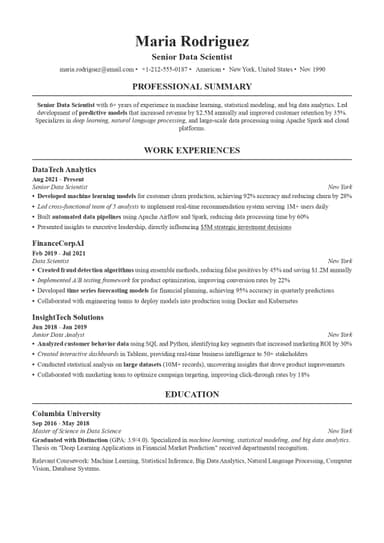
Times New Roman represents the traditional resume standard. However, many modern recruiters view Times New Roman as outdated. Consider Georgia or Cambria for a more contemporary serif option that maintains traditional appeal.
Let’s see how this font looks on a resume:

- Best for: Executive roles, traditional industries, leadership positions
- Font type: Serif
- Readability score: 8/10
- ATS compatibility: Very good
Garamond offers elegant efficiency. This classic serif font uses space economically, fitting more content per line than many alternatives without appearing cramped. The font's sophisticated appearance works particularly well for executive-level positions that want to convey authority and experience.
That said, here’s a quick look of the font on a resume:

- Best for: Business, finance, consulting, healthcare
- Font type: Serif
- Readability score: 8/10
- ATS compatibility: Excellent
Cambria represents modern serif design. Created for on-screen clarity, this font balances traditional serif characteristics with contemporary sensibilities. Its even spacing and strong vertical strokes enhance readability in both digital and print formats.
This is how it looks on a resume:

- Best for: Fashion, luxury brands, creative roles, design portfolios
- Font type: Serif
- Readability score: 7/10
- ATS compatibility: Good
This serif font's dramatic thick-and-thin strokes create visual interest and elegance. However, its distinctive appearance works better for creative portfolios than traditional resumes.
Here’s a quick peek at this font:

- Best for: Digital submissions, tech roles, online applications
- Font type: Sans-serif
- Readability score: 9/10
- ATS compatibility: Excellent
Designed specifically for digital displays, this sans-serif font uses generous spacing and wide characters that remain clear even at small sizes.
However, this means it takes more horizontal space than alternatives. You might need to adjust margins or content to fit everything on your resume comfortably.

- Best for: Marketing, communications, startup roles, tech companies
- Font type: Sans-serif
- Readability score: 8/10
- ATS compatibility: Very good
Trebuchet MS brings friendly professionalism to resumes. This humanist sans-serif font combines approachability with business-like appearance. Its slightly informal character works well for modern companies and startup environments.
Here’s what the Trebuchet MS font looks like on a resume:

- Best for: Modern companies, tech startups, creative industries
- Font type: Sans-serif
- Readability score: 9/10
- ATS compatibility: Very good
Lato delivers contemporary warmth. This modern sans-serif font's semi-rounded details create approachable professionalism. Its multiple weights provide flexibility for emphasizing different content sections.
Here’s how the Lato font looks in the work experience section of a resume:

- Best for: Traditional roles, publishing, education, nonprofit sector
- Font type: Serif
- Readability score: 8/10
- ATS compatibility: Very good
Book Antiqua presents a balanced serif design. This font offers traditional elegance without appearing stuffy or outdated. This font strikes a middle ground between ornate traditional serifs and stark modern designs.
It suggests thoughtfulness and attention to detail without overwhelming your content. Here’s what it looks like on a resume:

- Best for: Business roles, corporate positions, administrative positions
- Font type: Sans-serif
- Readability score: 8/10
- ATS compatibility: Excellent
Tahoma provides compact professionalism. This sans-serif font's narrow character width helps fit more content per line while maintaining readability. Its lack of decorative elements ensures focus remains on your skills and qualifications.
The font's utilitarian character suits practical business contexts, and here’s how it looks on a resume:

- Best for: Creative industries, European companies, design roles
- Font type: Sans-serif
- Readability score: 8/10
- ATS compatibility: Good
This humanist sans-serif font combines geometric precision with organic warmth. While less common in American business contexts, Gill Sans brings sophistication that resonates with creative and internationally-minded organizations.
Here’s how it appears on a resume:

- Best for: Design roles, tech companies, startups, modern corporations
- Font type: Sans-serif
- Readability score: 9/10
- ATS compatibility: Very good
Avenir presents modern geometric design. This sans-serif font's clean lines and balanced proportions create contemporary professionalism. Its name means "future" in French, reflecting its forward-looking aesthetic.
Avenir signals design awareness and contemporary sensibilities. It's an excellent choice for companies that value innovation and creative thinking.
This is how Avenir font looks on a resume:

Serif vs. Sans-Serif Fonts: Which Should You Choose?
The choice between serif vs. sans-serif fonts depends on your target industry. However, either works well with proper formatting and consistent spacing.
The table below outlines the difference between serif and sans-serif fonts:
| Feature | Serif Fonts | Sans Serif Fonts |
|---|---|---|
Appearance | Decorative strokes at letter endings | Clean, straight lines |
Examples | Times New Roman, Georgia, Garamond | Arial, Calibri, Helvetica |
Best For | Law, finance, academia, traditional industries | Tech, creative fields, startups, modern companies |
Perception | Professional, traditional, established | Contemporary, straightforward, innovative |
Readability | Excellent in print | Excellent on screens and print |
How to Choose the Right Font Size for Your Resume
Font size affects readability as much as font choice. Too small strains eyes and appears dense; too large wastes valuable space and appears amateurish.
Finding the right balance requires understanding how different elements function.

Also, white space matters as much as text size. Adequate spacing between lines and paragraphs prevents your resume from appearing cramped. Use 1.0 to 1.15 line spacing for body text and add extra space before and after section headers to create visual breathing room.
Font Pairing: How to Combine Fonts Effectively
Using two fonts can create visual hierarchy and interest, but requires careful execution. The key lies in choosing complementary typefaces that contrast without conflicting.
Here are recommended pairings to balance visual weight and character:
- Calibri (headers) + Georgia (body)
- Helvetica (headers) + Arial (body)
- Garamond (headers) + Calibri (body)
When in doubt, stick with a single font. Using one typeface throughout creates cohesive professionalism and eliminates the risk of poor pairing. You can still create hierarchy through size variations, bold text, and strategic spacing with just one font.
5 Types of Fonts to Avoid on Your Resume
Certain fonts damage your credibility regardless of your qualifications. These typefaces signal poor judgment, lack of professionalism, or careless attention to detail—none of which serve your job search.
#1. Comic Sans

Comic Sans destroys professional credibility instantly. Designed for comic book speech bubbles, this casual script font has no place in business contexts.
Using Comic Sans signals either ignorance of professional norms or deliberate disregard for conventional expectations—neither impression helps your candidacy.
#2. Papyrus

Papyrus looks dated and amateurish. This font's artificial ancient appearance creates immediate visual dissonance in modern professional documents. Its irregular letterforms also reduce readability and confuse ATS systems.
#3. Brush Script/Cursive Fonts

Script fonts might look elegant in wedding invitations, but they fail completely in resumes. ATS systems can't parse them reliably, and recruiters struggle to read them quickly. These fonts sacrifice functionality for decorative appearance that adds no professional value.
#4. Courier

Courier evokes typewriter era aesthetics that feel outdated. Its monospaced characters waste horizontal space and reduce the amount of information you can fit on one page. The font's mechanical appearance also lacks the polish modern resume standards demand.
#5. Decorative Fonts

Any highly stylized or decorative font undermines professional presentation. These attention-grabbing typefaces distract from content and suggest you're trying to compensate for weak qualifications with visual tricks. Professional documents require professional fonts.
Create a Professionally Formatted Resume With ResumeBuilder.so in Minutes
ResumeBuilder.so takes the guesswork out of font selection and formatting. Our smart resume builder features carefully curated templates with pre-optimized typography, ensuring your document meets industry standards. Each resume template uses professional fonts at ideal sizes, with proper spacing and visual hierarchy built in.
Browse our extensive resume examples to see how different fonts work across various industries and career levels. Whether you're targeting creative roles or conservative fields, ResumeBuilder.so offers font pairings that enhance readability and professionalism.
Final Thoughts
The best font for your resume balances professionalism, readability, and ATS compatibility. Calibri, Arial, and Helvetica remain safe choices across virtually any industry, while fonts like Georgia and Garamond work well for traditional fields.
Remember that font size matters as much as font choice—use 10-12 points for body text and maintain consistency throughout your document. However, your font choice supports your professional story—it shouldn't dominate it. Select a clean, readable typeface and let your achievements, skills, and experience take center stage.
Best Font for Resume FAQs

Max Harper is the resume guru who actually makes job searching easier. With years of experience as a hiring manager, Max knows what makes a resume stand out in a pile of 200+ applications. From breaking down ATS myths to helping you craft bullet points that pop, Max shares easy-to-digest, no-BS resume advice.