How to Write Your Address on a Resume & When to Avoid It

To write an address on a resume, you should place it in the contact information section at the top of the page, usually near your name, phone number, and email address. In most cases, include only your city and state, such as “Austin, TX,” rather than your full street address.
Disclosing all the location details without a second thought can actually work against you now. Too much information may bring your privacy on a resume in question, and in some cases, a full street address can trigger unconscious bias before a recruiter even reads your first bullet point. Or even worse, formatting it wrong can cause ATS software to skip your application entirely.
In this guide, we’ll explain how to do this properly, which resume address format to use, and when leaving it out (or trimming it down) is the smarter move.
- In most cases, you don’t need to include your full street address on a resume; listing your city and state is usually enough.
- It should appear in the resume header alongside your name, phone number, email address, LinkedIn URL, and other contact details.
- The best format depends on your situation, i.e., whether you’re applying locally, remotely, internationally, or planning to relocate.
- For ATS compatibility, keep your address in plain text and avoid putting it inside tables, text boxes, images, icons, or decorative formatting.
- You should only include a full mailing address when the employer requests it, the role requires residency verification, or you’re submitting a paper application.
Should I Put My Address on a Resume?
Whether you should put your address on your resume depends on the type of job you're applying for and your privacy preferences. The short answer for most people is that you should add your city and state, but your full street address probably shouldn’t be disclosed.
This is a real shift from even ten years ago; hiring has gone increasingly digital, and full home addresses are less relevant to most employers than they used to be.
At the same time, identity-related risks have gone up. Sharing your street number, city, and ZIP with every company you apply to means that information is now in dozens of databases you have no control over. That said, there are situations where including more detail is the right call.
When You Should Include Your Address
- The job posting explicitly requests a full mailing address.
- The role is in-person or local, and the employer cares about commute distance.
- You're submitting a paper application or sending materials by mail.
- The position requires residency verification; government roles, security clearances, or state-licensed professions sometimes fall into this category.
When You Should Leave It Out (or Abbreviate)
- You're applying for a fully remote position where location is irrelevant.
- Privacy is a concern; you don't want your home address in dozens of company databases.
- You're worried about location-based screening or other forms of bias.
- Your resume header is already crowded, and adding a full address would push other important contact details off the page.
How to Write Your Address on a Resume
You can write your address on a resume in several formats, ranging from a full mailing address to just your city and state. The right choice depends on your situation, but most candidates today land somewhere in the middle.
Here are the five main formats, with examples:
Use when: The job listing specifically asks for it, the role requires residency verification, or you're sending a paper application.
Format: Street Number + Street Name, City, State, ZIP Code
Example: 412 Maple Street, Austin, TX 78701
A quick note on ATS compatibility: if you go this route, keep it plain text on a single line. ATS systems parse resume contact information linearly, so fancy formatting, tables, or text boxes in the header area can break the parsing and make your address invisible to the system.
Use when: You want to confirm proximity without over-sharing personal data. This is the modern standard for most job seekers.
Format: City, State
Example: Austin, TX
If you're listing a state that uses an abbreviation that's easy to confuse (MI for Michigan vs. MS for Mississippi vs. MO for Missouri), you may want to spell out the full state name, especially if the role is location-sensitive.
Use when: You're applying to companies across borders, or the employer is multinational, and your country matters for employment authorization or timezone purposes.
Format: City, Country
Example: Toronto, Canada
Keep it clean and simple. You don't need a province or region unless the country is large enough that it's genuinely relevant (e.g., Sydney, Australia vs. Melbourne, Australia for a role requiring in-person attendance).
Use when: You want ATS systems to detect your general location without revealing your full address or even your city.
Format: ZIP or Postal Code
Example: 78701
This is the least common option and works better for larger metropolitan areas where a ZIP code doesn't immediately identify a specific neighborhood. It's an acceptable middle ground for privacy-conscious candidates.
Use when: You're actively planning to move or are willing to relocate for the right opportunity.
Format: Current City, State (Relocating to Destination City, State) or Current City, State | Open to Relocation
Example: Chicago, IL (Relocating to Austin, TX)
This shows initiative, since the recruiter doesn't have to wonder why your location doesn't match the role. You can also elaborate on your relocation timeline in your cover letter, which gives you more space to address any questions before they come up.
Where to Put Your Address on a Resume
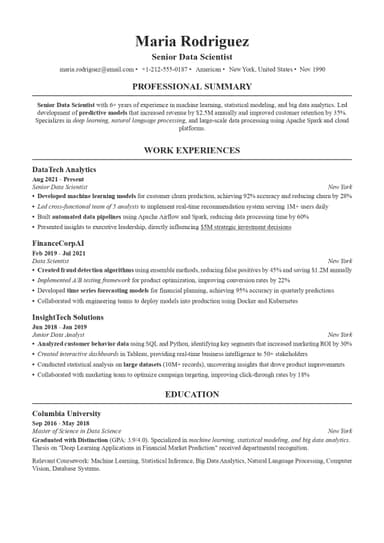
You should put your address in the resume header, grouped with your other contact details directly below your name. This is where recruiters expect to find it, and it's where ATS systems are designed to look for it.
A standard header includes:
- Full name (largest text on the page)
- Phone number
- Professional email address
- City and state (your address)
- LinkedIn URL
- Portfolio or personal website (if applicable)
You can run all of this on one line, or stack it across two; both will work. The key is consistency, so don't scatter contact information throughout the document. It should all be in one place, at the top, easy to scan in under three seconds.
Left-aligned headers are standard for most industries, while centered headers are common in creative fields (design, media, and the arts), where visual presentation is part of the application itself. Either is fine; just make sure the overall layout feels intentional and clean.
How to Format Your Address on a Resume for ATS
To format your address on a resume for ATS, use plain text with no special characters, tables, or text boxes in the header area. ATS software reads documents left-to-right, top-to-bottom, and it trips up on anything that disrupts that flow.
Also, ATS systems don't just read your resume for keywords, but also filter by location. For instance, a recruiter running a search for candidates within 50 miles of Dallas will miss your application entirely if the system can't parse your city and state on a resume. That's a fixable problem, and it starts with clean formatting.
Common ATS formatting mistakes to avoid include:
- Text boxes: Information inside a text box is often invisible to ATS, as the system reads around it, not through it.
- Tables in the header: Same issue; stick to plain text for your contact information.
- Symbols or icons before your address: Some ATS systems can't process decorative characters (like a location pin emoji) and will skip the text following it.
- Non-standard abbreviations: Use official state abbreviations (TX, CA, NY) or spell out the full name.
- Two-column layouts for the header: If your name is in one column and your contact information is in another, ATS may read them out of order or miss the contact block entirely.
The simplest approach is to have one clean block of text at the top of the page.
According to Bureau of Labor Statistics data, remote and hybrid work remain far more common than they were before the pandemic. There were 35.5 million people teleworking or working from home for pay in the first quarter of 2024, which means location-based ATS filtering is becoming both more common and more nuanced.
Address on Resume: Special Situations
Most resume address advice applies to straightforward cases, in which you live where you want to work, and you're applying locally. Yet, plenty of candidates don't fit that mold, so here's how to handle the trickier scenarios.
Remote Job Applicants
For remote roles, a full street address is almost never necessary. But skipping your location entirely can raise flags with ATS systems, which are often configured to filter for general geographic eligibility (timezone, country, work authorization region). The cleanest solution here is to list your city and state, and add "Remote" after it.
Austin, TX | Remote
This tells ATS where you are, tells recruiters your timezone, and makes it clear you're targeting remote work. If the job posting says location doesn't matter, you can drop the "Remote" tag, but keep the city and state.
Candidates Relocating for a Job
Mentions of relocation on your resume are one of those things that recruiters notice immediately if your current location doesn't match the job's location, so don't leave them guessing. List your current city and state, followed by your intended destination.
Detroit, MI → Relocating to Los Angeles, CA
This approach signals that you've already made the decision, and that you're not just open to moving, but that you're actively planning it. That's reassuring to hiring managers who've had candidates back out mid-process over relocation concerns.
International Candidates Applying in the U.S.
If you're applying to U.S.-based roles from another country, list your current city and country in the address field:
London, UK
Work authorization (whether you need a visa, have an existing work permit, or hold citizenship) should be addressed separately. The best place for it is your resume summary section or your cover letter. Don't cram it into the header, and don't skip it entirely.
U.S. employers are legally required to verify authorization, so it's better to address it upfront than have it become an awkward conversation later.
Using a P.O. Box
This option is generally not recommended. A P.O. box address on a resume can signal instability to some recruiters, even if that's not your situation at all. If you have privacy concerns about your home address, a better option is to use the address of a trusted friend or family member, with their permission, or simply list the city and state without a street.
No Fixed Address
If you're between addresses, a digital nomad, or temporarily staying somewhere, list the city and state where you spend the most time, or the city of the role you're targeting if you're open to being there.
Miami, FL | Open to Relocation
Keep it simple, since recruiters don't need your residential history; they need to know you're reachable and location-compatible with the role.
Address on a Resume: What NOT to Do
Some resume address mistakes are easy to make, but they’re also easy to fix, so here's a quick-hit list of what you shouldn’t do:
- List an outdated address. If you've moved since you last updated your resume, fix it before sending. It sounds obvious, but many people fail to do so.
- Don't place your address inside a text box or image. ATS can't read it, and you'll be filtered out without ever knowing why.
- Don't skip the location entirely when applying for an in-person role. A missing city and state on a locally-focused application looks like an oversight, or worse, like you're applying from far away without saying so.
- Don't list an international address without noting your work authorization status if you're applying to jobs in another country; employers will wonder.
Final Thoughts
Writing your address on a resume is simple once you know what employers actually need. In most cases, your city and state are enough to show your location without sharing unnecessary personal details. A full street address may still be useful for some local roles, government jobs, or applications that specifically ask for it, but it is no longer required for every resume.
If you'd rather not think about any of this, ResumeBuilder.so handles it automatically. Our resume generator formats your contact information (address included) in a layout that's both ATS-friendly and recruiter-ready. It’s enough to choose a template designed for your industry and fill in your details; the formatting takes care of itself!
How to Write an Address on a Resume FAQ

Jordan Lee is your guide to navigating the rapidly changing job market in the age of AI and automation. He dives into how AI is reshaping hiring, the skills of the future, and what job seekers need to do now to stay relevant. If you’re curious about how technology is transforming careers and want to future-proof your job, Jordan’s insights are a must-follow.