Resume Contact Information: What to Include & How to Format It

Resume contact information refers to the section at the top of your resume that tells employers how to reach you.
Writing this section correctly means keeping it accurate, professional, and easy to find. Even small mistakes, like an outdated phone number or unprofessional email, can cost you interview opportunities before your qualifications are even reviewed.
In this article, you’ll learn exactly how to write contact information on a resume and what to leave out. We’ll also cover formatting tips, optional details, common errors to avoid, and how to make sure this section supports your application instead of weakening it.
- Professional contact information is a critical resume header section that must be accurate, professional, and ATS-friendly so employers can easily reach you.
- Include only essentials: full name, phone number, professional email for a resume, city and state, LinkedIn URL, and a portfolio link if relevant.
- Leave out sensitive or irrelevant details like full address, photo (in the U.S.), SSN, age, marital status, salary, or personal social media.
- Formatting should be clean and simple: no tables, text boxes, headers/footers, or decorative elements that confuse ATS systems.
- The most damaging mistakes are typos, outdated information, unprofessional email addresses, and inconsistent formatting that undermine credibility before your qualifications are even reviewed.
Why Resume Contact Information Matters
Resume contact information matters because it's the primary way recruiters and hiring managers will reach you for interviews and job offers. Without accurate details, you've essentially locked the door on your dream job.
Most resumes nowadays get screened by applicant tracking systems (ATS) before any human sees them. If your contact information isn't formatted correctly, the ATS might not parse it properly, which means your application could get flagged or rejected.
Even worse, if a recruiter does want to contact you but your phone number's wrong or your email bounces back, they'll simply move on to the next candidate.
This resume section also shapes first impressions. A professional, well-formatted resume header information signals attention to detail and professionalism. On the flip side, an unprofessional email address or cluttered formatting suggests carelessness.

6 Essential Contact Information Details for Your Resume
Let's break down the must-have elements for a contact section on a resume.
#1. Full Name
Your full name should be the most prominent element on your resume. Use the name you go by professionally, which is typically your first and last name or a professional variation you prefer. Format it in a larger font size (14-18 points) and bold it to make it stand out.
Skip prefixes like "Resume of" or "CV of"; these are unnecessary and waste space. If you have professional credentials that are highly relevant to the position (like a PhD, an MD, or a CPA), you can include them after your name. Otherwise, keep it simple.
#2. Phone Number
One primary phone number on a resume is standard; your mobile number is usually the best option. Format it consistently using either (555) 123-4567 or 555-123-4567; both work fine; just pick one style and stick with it.
Before you submit your resume, set up your voicemail with a professional greeting. Also, make sure your voicemail box isn't full; you'd be surprised how often this happens.
If you're applying for jobs internationally, include your country code (+1 for United States numbers). Additionally, when applying to multiple locations or wanting extra privacy, consider setting up a Google Voice number you can manage separately from your personal line.
Triple-check your phone number for typos. One wrong digit means missed interviews, and there's no way for the recruiter to tell you about the mistake.
#3. Email Address
Your resume email address needs to be professional; the best format is firstname.lastname@gmail.com or a similar variation using your actual name. If that's taken, try first initial plus last name (j.smith@outlook.com) or add a middle initial.
Stay away from addresses like "partyanimal@," "xXgamerXx@," or anything with outdated slang. Also, avoid using your current work email for job applications; it's unprofessional and could violate your employer's policies.
It’s best to create a new email address specifically for your job search if your current one isn't professional. Use popular email providers like Gmail or Outlook that are universally recognized and reliable, and check this email daily during your active search.
Here's what works and what doesn't:
- ✓ john.smith@gmail.com
- ✓ j.smith@outlook.com
Bad Examples
- ✗ johnnyboy2000@email.com
- ✗ coolcat247@email.com
#4. Location
You don't need your full street address on your resume anymore; city and state are enough, and you can mention them in the format such as "New York, NY" or "Austin, TX." This gives employers the location information they need without compromising your privacy or taking up valuable space.
If you're applying internationally, include your country, and for remote positions, consider adding "(Open to remote work)" after your location. However, if you're relocating soon, you might format it as "Austin, TX (Relocating to Denver, CO in May 2025)."
With remote work becoming standard, being upfront about your location and flexibility can actually help your application; just make sure you're honest about any relocation timelines or requirements.
#5. LinkedIn Profile URL
Your LinkedIn profile belongs on your resume. With 87% of recruiters using LinkedIn to vet candidates, not including it is a missed opportunity, so you should do your best to customize it and present it properly.
For example, instead of the default “linkedin.com/in/john-smith-78945621”, change it to “linkedin.com/in/johnsmith” or “linkedin.com/in/john-smith”. This looks more professional and is easier to remember, and you can apply such settings under Edit public profile & URL.
Before all that, make sure your profile is complete, updated, and matches the information on your resume, as an incomplete or inconsistent one actually hurts more than it helps.
#6. Portfolio/Website (If Relevant)
For certain fields (such as design, development, writing, or marketing), a portfolio link is essential, so if you have one, include it. Use a custom domain (yourname.com) if possible, as it looks more professional than a free hosting subdomain.
Furthermore, make sure your portfolio is mobile-friendly and up-to-date, showing your best work. Developers can use their GitHub profiles for this purpose, while designers should link to Behance or Dribbble; writers, on the other hand, might link to Medium or a personal blog.
Still, only include portfolio links if they're relevant to the job and showcase high-quality work; a half-finished website or outdated portfolio will do more harm than good.
Contact Information You Should Never Include in Your Resume
You should never include sensitive personal information, such as the following, on your resume:
- Social Security Number (SSN) or government ID numbers
- Date of birth or age
- Marital status or number of children
- Religious or political affiliation
- Photograph (unless specifically requested or standard in your country)
- Full home address with street number
- Current salary information
- References (create a separate document instead)
- Personal social media accounts
Why does this matter? First, these details aren't relevant to your qualifications; second, including them opens the door to discrimination or even unintentional bias. Additionally, they create identity theft and privacy risks, and may cause ATS parsing issues that might lead to recruiters rejecting your application.
The Equal Employment Opportunity Commission (EEOC) guidelines make clear that employers shouldn't make hiring decisions based on personal characteristics like age, religion, or marital status. By leaving these details off, you help ensure you're evaluated on merit.
However, in some countries, including photos and personal resume information, is standard practice, so if you're applying internationally, research the norms for that specific area before submitting your application.
How to Format Your Resume Contact Information
To format your resume contact information effectively, you should place it prominently in the header section using clear, readable fonts with proper spacing and alignment. The format you choose shapes how recruiters perceive your professionalism.
Placement Options
Here are the resume contact information placement options you can choose from:
- Center-aligned header is the most traditional approach. Your name appears centered at the top in a larger font, with contact details centered beneath it. This clean, symmetrical look works well for most industries.
- Left-aligned header offers a modern, streamlined alternative. Everything aligns to the left margin, which saves vertical space and creates a contemporary feel. This works particularly well for creative fields or when you need to maximize page space.
- Two-column header splits information between left and right; typically name on the left with contact details on the right. This efficient use of space maintains a professional appearance while keeping everything scannable.
Best Practices Related to Fonts and Formatting
Use the same font throughout your resume, including the contact section. Your name should be 14-18 points and bold, while contact details on a resume can be 10-12 points in regular weight, with consistent spacing between elements.
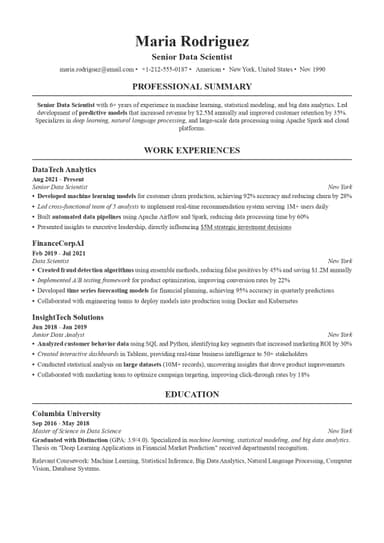
When listing multiple contact items on one line, use separators like the vertical bar (|) or bullet point (•) between them, just like in the following example:
JOHN SMITH
New York, NY | (555) 123-4567 | john.f.smith@example.com | linkedin.com/in/john.f.smith
Make sure email addresses and LinkedIn URLs are clickable in digital versions, and use icons sparingly; while they look nice, many ATS systems can't read them properly.
ATS-Friendly Formatting Tips
To make sure your resume remains ATS-friendly, you should:
- Avoid text boxes or tables for contact information, as these systems struggle with such elements.
- Stick to standard characters and formatting. Test your resume by converting it to plain text to see if the contact information still appears correctly.
- Use standard section headings that ATS systems recognize.
Special Considerations for Resume Contact Information
Now, let’s have a look at some aspects you should have in mind when presenting resume contact information for specific job opportunities:
Remote Job Applications
If you're applying for remote positions, indicate your openness clearly. Format it as "Austin, TX (Open to remote work)" or "New York, NY - Remote." Be transparent about your current location if the employer might need to consider time zones or state-specific employment requirements.
International Applications
For international job applications, include your full phone number with country code (e.g., +1-555-123-4567), specify your country in your location line, and be mindful of date format differences. You might also need to address work authorization separately in your cover letter.
Career Changers
If you're making a career change, ensure your email address sounds appropriate for your target industry. For example, a "thecreativedirector@" email works for advertising but seems odd for accounting roles. Also, update your LinkedIn to reflect your new career direction before adding it to your resume.
Recent Graduates
Students and recent graduates should use a permanent address rather than dorm addresses. If your email is still a .edu address from college and it's more than a year old, consider creating a new Gmail account. Moreover, you should build out your LinkedIn profile before adding it to your resume, since an empty profile is worse than no link at all.
5 Common Contact Information Mistakes to Avoid
The most common contact information resume mistakes include:
- Unprofessional email addresses. As previously mentioned, these kill your credibility instantly. You should create a new email today; it takes five minutes and could save your candidacy.
- Typos in contact details. Such mistakes are surprisingly common. A single wrong digit in your phone number means recruiters can't reach you, so always triple-check; better yet, have someone else verify your contact information.
- Outdated information. If you moved cities or changed phone numbers but forgot to update your resume, you're ruining your chances of being contacted if recruiters like your resume. Make updating your contact information the first step before any application.
- Missing important details. Not mentioning essentials like your location, for example, can make recruiters reject your application, as they want complete information.
- Formatting issues. If you've put contact information in a header or footer, it might not be parsed correctly, so keep it simple and test with ATS-friendly formatting.
Create a Perfect Contact Information Section With Our Tool

Stop wrestling with formatting and let our resume builder handle your contact section automatically! Our platform will create a properly structured contact information part according to the details you provide, ensuring it’s always ATS-friendly and professionally presented.
All you should do is choose from our library of professional resume templates designed for your industry. Once you enter your contact information, our system will format it properly, alongside other parts of your resume, creating a fully customized job application document within minutes!
You will also be able to download your resume in multiple formats and change it whenever you need to update the existing details.
Final Thoughts
Your resume contact information is more than just details at the top of a page. If you get it wrong, recruiters can't reach you, no matter how perfect the rest of your resume is. So, get it right, and you've cleared the first hurdle toward landing interviews.
Professional tools like ResumeBuilder.so take the guesswork out of formatting, letting you focus on what really matters: showing employers why you're the perfect fit. Once you properly format your contact details, they become your gateway to interviews, so make every detail count.
Resume Contact Information FAQ

Max Harper is the resume guru who actually makes job searching easier. With years of experience as a hiring manager, Max knows what makes a resume stand out in a pile of 200+ applications. From breaking down ATS myths to helping you craft bullet points that pop, Max shares easy-to-digest, no-BS resume advice.