Computer Skills for a Resume: How to List Them Properly

Computer skills are the technical abilities that help you use digital tools, software, devices, and online platforms effectively. They can include basic tasks, such as typing, email, and file management, as well as more advanced abilities like data analysis, coding, cybersecurity, or industry-specific software knowledge.
Since most jobs now involve some level of technology, strong computer skills can make your resume more relevant and show employers that you can work efficiently in a modern workplace. This article breaks down the most valuable ones and shows you how to list them properly so that they come off as practical, current, and useful on the job.
- Computer skills include both basic digital abilities, such as email, file management, and online research, and advanced technical skills, such as data analysis, AI tools, cloud platforms, and industry-specific software.
- The best ones are specific, relevant to the job description, and tied to real workplace tasks rather than listed vaguely as “computer literate” or “proficient in Microsoft Office.”
- A well-crafted resume should include these in a dedicated skills section and reinforce them in work experience bullets with measurable results.
- Tailoring your computer skills to the role is essential because ATS systems often scan for exact tool names, software platforms, and technical keywords from the job posting.
- Common mistakes include listing outdated technology, exaggerating your proficiency, overloading the skills section, and leaving out specialized tools that matter in your industry.
What Are Computer Skills?
Computer skills are the abilities that allow you to use digital tools, software, and systems to complete professional tasks. They fall into two broad types:
- Hardware skills, which involve physical devices like computers, printers, and peripherals, and
- Software skills, which cover applications, platforms, and programs you use to do your job
The reason these skills matter more than ever comes down to how the workplace has shifted.
Cloud platforms have replaced local servers, AI tools have entered everyday workflows, and remote collaboration has become standard practice across industries. All of this requires the use of specific tools that are supposed to make these circumstances smoother.
Furthermore, according to the National Skills Coalition and the Federal Reserve Bank of Atlanta, 92% of jobs analyzed require digital skills, showing how important digital competency has become across today’s labor market.
However, the term "computer skills" is a broad umbrella, and it spans everything from typing speed and file management to machine learning and cloud architecture. What matters is relevance to the role you're targeting.
Full List of Computer Skills for Your Resume
Basic computer skills are the foundational abilities every professional needs to function in a modern workplace. They're table stakes, but they still belong on your resume in the right context.
The essentials include:
- Microsoft Office Suite (Word, Excel, PowerPoint, Outlook)
- Google Workspace (Docs, Sheets, Slides, Gmail, Calendar)
- Email management and professional communication
- File organization, cloud storage, and folder management
- Web browsing, online research, and digital communication
- Video conferencing tools, e.g., Zoom, Microsoft Teams, Google Meet, etc.
Here, we break down the most in-demand ones by category so that you can quickly identify what applies to your role and lift it directly into your resume.
#1. Google Workspace and Microsoft Office Skills
Microsoft Office and Google Workspace skills are among the most frequently requested computer skills across virtually every industry, from startups to enterprise organizations and government agencies.
However, there's a big difference between just listing them and listing them well, so consider these two approaches:
Weak
"Proficient in Microsoft Office"
"Excel (PivotTables, VLOOKUP, Power Query, conditional formatting)."
The second version is more likely to pass ATS filters, shows genuine expertise, and gives the interviewer something concrete to probe. The specific programs you can mention include:
- Advanced Excel (including macros, PivotTables, and Power Query); it’s a sought-after skill that many candidates overlook
- PowerPoint, which showcases data visualization and presentation design skills
- Word, along with mail merge and styles (especially in administrative or operations roles)
If you want to formalize your expertise, Microsoft certifications like the Microsoft Office Specialist (MOS) credential add real credibility to your resume.
#2. Communication & Collaboration Tools
Proficiency in these shows employers you can work efficiently with remote and hybrid teams, which, in 2026, covers many workplaces.
Tools worth listing in this category include:
- Slack, Microsoft Teams (internal messaging and channel management)
- Zoom, Google Meet, Loom (video communication and async updates)
- Asana, Trello, Monday.com (project tracking and task management)
- Notion, Confluence (documentation and knowledge management)
- Google Drive, SharePoint (file sharing and collaboration)
Project management platforms have quietly moved from a "nice to have" to a technical skill for a resume in the eyes of hiring managers. So, if you've managed cross-functional work in Asana or built out a Notion workspace, say so specifically.
#3. Data Analysis & Reporting Skills
Data analysis skills help employers see that you can turn raw numbers into decisions, which is one of the most valued abilities nowadays, regardless of your industry.
This category covers a wide range of abilities, such as:
- Google Sheets (functions, dashboards, collaborative reporting)
- Tableau, Power BI (visual dashboards and data storytelling)
- Google Analytics, Looker Studio (web and marketing analytics)
- SQL (querying databases, even at a basic level)
- Python or R (relevant for roles with any analytical component)
#4. AI & Automation Skills
AI skills for a resume have become baseline requirements across most industries because employers look for professionals who can leverage AI tools to boost productivity. This is probably the fastest-moving category on this list.
Key AI and automation tools to consider listing would be:
- ChatGPT, Claude, Gemini (prompt engineering and AI-assisted workflows)
- Jasper, Copy.ai (AI writing and content generation)
- Midjourney, Adobe Firefly (AI image creation and visual design)
- Zapier, Make (formerly Integromat) (workflow automation between apps)
- Microsoft Copilot (AI integration across the Office suite)
Employers consistently cite AI literacy as a differentiating factor between otherwise comparable candidates, so treat this category seriously.
#5. Design & Creative Software
Knowledge of such software demonstrates your ability to create polished visual assets. This is often relevant for marketing, communications, content creation, and many management roles where you're expected to produce presentation-ready materials.
Here are some tools you can list by proficiency:
- Adobe Creative Suite: Photoshop (image editing), Illustrator (vector graphics), InDesign (layouts), Premiere Pro (video)
- Canva (accessible design for social media, presentations, and branded content)
- Figma, Sketch (UI/UX design and prototyping)
- Final Cut Pro, DaVinci Resolve (video editing)
#6. Cloud & IT Skills for a Resume
Listing these abilities in your resume shows that you can operate within modern digital infrastructure. This is a growing requirement across business and technical roles alike, not just IT departments.
For non-technical roles, focus on:
- OneDrive, Google Drive, Dropbox (cloud file storage and management)
- SharePoint (enterprise content management)
- Salesforce CRM (customer relationship management)
- Microsoft Azure, AWS, Google Cloud Platform (cloud platform navigation)
Yet, for technical roles, go deeper by mentioning:
- Cloud architecture, deployment, and infrastructure management
- Basic networking concepts (DNS, VPNs, firewalls)
- Cybersecurity fundamentals (access control, data protection, HIPAA compliance)
Certifications matter here, too. The AWS Cloud Practitioner, Google Cloud Digital Leader, and Microsoft Azure Fundamentals are accessible, respected credentials that strengthen your resume without requiring a technical degree.
#7. Industry-Specific Computer Skills
Depending on your industry, you’ll have to know how to use the tools and platforms unique to it, and these are often the most critical ones to include on your resume. They can also make or break ATS filtering in specialized roles, because hiring managers configure their systems to screen for them directly.
Let’s see some computer skill examples for different fields:
| Industry | Must-Have Tools |
|---|---|
Finance & Accounting | QuickBooks, SAP, Bloomberg Terminal, Oracle, Xero |
Healthcare | Epic, Cerner, Meditech, HIPAA-compliant platforms, Kareo |
Marketing | HubSpot, Salesforce Marketing Cloud, SEMrush, Mailchimp, Meta Ads Manager |
Engineering / Architecture | AutoCAD, SolidWorks, Revit, MATLAB, SketchUp |
Human Resources | Workday, ADP, BambooHR, Greenhouse, Lever |
Legal | Clio, Relativity, Westlaw, iManage |
How to List Computer Skills on a Resume
You can list computer skills on your resume by creating a dedicated skills section, integrating them into your work experience bullets, or combining both methods for maximum impact.
#1. Create a Dedicated Computer Skills Section
A clearly labeled skills section gives ATS software a reliable place to parse your abilities, which improves your chances of making it past the screening. Organize by category rather than dumping everything into a single line; for example:
- Technical Skills Office Suites: Excel (PivotTables, VLOOKUP, Power Query)
- Google Sheets Data Tools: Tableau, Google Analytics, SQL (basics)
- AI Tools: ChatGPT, Microsoft Copilot, Zapier Collaboration: Slack, Asana, Notion
If you aren’t sure how to do so on your own, ResumeBuilder.so can help. Our AI generator can create all the sections of your resume in your stead, including this one.
The platform offers some resume templates which support formatting that's been tested against major applicant tracking systems. This is a faster starting point than building a skills section from scratch, and also the best way to optimize your job application.
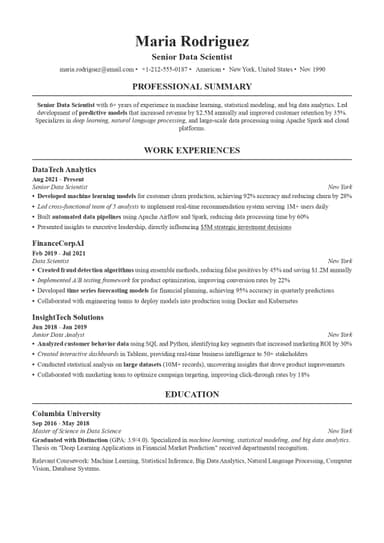
#2. Integrate Computer Skills into Work Experience Bullets
Listing skills in isolation is only half the equation< the other half is showing how you actually used them. That's where your work experience bullets come in.
Compare these two versions of the same bullet:
Before
"Prepared monthly sales reports."
"Analyzed monthly sales data using Excel PivotTables and Power Query, cutting reporting time by 40%."
The revised version names the tool, shows the application, and quantifies the result, which satisfies both ATS keyword matching and the human reviewer's need to understand impact.
Aim to echo at least 3–4 of your most important computer skills within your experience bullets, not just in the skills section.
#3. Match Skills to the Job Description
ATS systems scan for exact keyword matches. If the job posting says "Tableau," write "Tableau", and do not put "data visualization software" or "BI tools" instead. Close enough isn't close enough when a machine is doing the comparison.
The practical approach would be to pull up the job description, highlight every tool name and software mentioned, then cross-reference with your own skills. Include both acronyms and full names where there's any ambiguity (e.g., "SQL (Structured Query Language)").
5 Common Computer Skills Resume Mistakes to Avoid
Avoiding computer skills mistakes on your resume can be the difference between passing the ATS and getting filtered out before a human reads a single line. These five errors show up constantly:
Windows XP proficiency, Lotus Notes, Adobe Flash, and similar skills are considered outdated. Mentioning these shows that your skills haven't kept pace. Swap outdated tools for their modern equivalents and remove anything that predates the current decade unless it's explicitly relevant to the role.
"Microsoft Office" or "computer literate" without specifics adds no value and may actually hurt your ATS ranking if the system is scanning for named tools. Name exact programs and, where possible, specific features or functions within them.
Claiming "Expert" in eight technologies is a red flag for experienced hiring managers; interviews often include technical screens, and exaggerations become obvious fast. "Proficient" and "familiar with" are honest, defensible, and actually more credible than blanket expert claims across every tool you've touched.
A targeted list of 8–12 skills is the standard. Recruiters just skim job applications, so you should make the most relevant skills easy to spot. Prioritize tools mentioned in the job posting and cut anything that isn't doing real work on the page.
Many applicants list only general tools and miss the specialized software skills that hiring managers care most about. For example, in healthcare, Epic or Cerner might be non-negotiable, while in finance, SAP or Bloomberg Terminal could be the deciding factor. Always check the job description for role-specific platforms and make sure you include these where they belong.
Final Thoughts
Listing the right computer skills on your resume means being specific and honest about your level, as well as always tailoring your list to the role. The days of writing "proficient in Microsoft Office" and calling it done are behind us.
A dedicated, categorized skills section that gives ATS software what it needs to match the achievement-oriented bullets in your work experience. Together, these cover both the machine and the human review, making it easier for you to reach the next level of the hiring process.
Computer Skills for Resume FAQ

Daniel Carter is the salary negotiation coach you wish you had before accepting that lowball job offer. With years of HR experience, he knows all the employer tactics—and how to counter them. His posts break down negotiation strategies, industry salary trends, and scripts you can actually use in real conversations.