How to Make a Resume in 2026: All-in-One Guide

Making a good resume means organizing your work history, skills, education, and achievements into a structured document that shows employers why you’re a strong fit for a specific role. It’s not just a list of past jobs; it requires choosing relevant experience, highlighting measurable results, and tailoring the content to match what hiring managers are looking for.
In this article, you’ll learn how to make a resume step by step, from choosing the right format to avoiding some common mistakes along the way. We’ll cover what sections to include and how to tailor your resume for different jobs, as well as offer some practical tips to help your application stand out in a competitive job market.
- A resume isn’t a job history list; it’s a targeted marketing document that highlights relevant experience, measurable results, and clear value for a specific role.
- Reverse-chronological format, strong contact details, and a tailored summary are foundational because recruiters scan fast and expect a familiar structure.
- The work experience section carries the most weight, and impact is proven through action verbs and numbers, not generic duty descriptions.
- Skills, education, and optional sections should be chosen strategically to match the job description and pass ATS keyword screening.
- The biggest success factor is customization plus clean formatting and thorough proofreading—generic, cluttered, or error-filled resumes get filtered out quickly.
What Is a Resume?
A resume is a concise document, typically one to two pages, that summarizes your professional experience, education, skills, and qualifications for potential employers. It acts as your professional highlight reel; it's not your life story but rather a targeted document designed to get you an interview and help you land the desired role.
It’s important to clarify that resumes aren't the same as CVs (curriculum vitae), though people sometimes use these terms interchangeably. Resumes aren’t long—one to two pages—and are used for most job applications in the United States. CVs, on the other hand, are comprehensive documents running two or more pages, typically used in academia, research, medical fields, or for international applications.
Since recruiters spend only a few seconds scanning each resume, it's of utmost importance to showcase your qualifications efficiently. A strong resume helps you stand out from dozens (sometimes hundreds) of other candidates competing for the same position, so let’s explore all the steps you should take to make a solid one.
3 Professional Resume Examples by Experience Level
Before we continue, let’s see some resume examples for an entry-level, mid-level, and senior candidate:
Entry-Level Resume Example

Mid-Level Resume Example

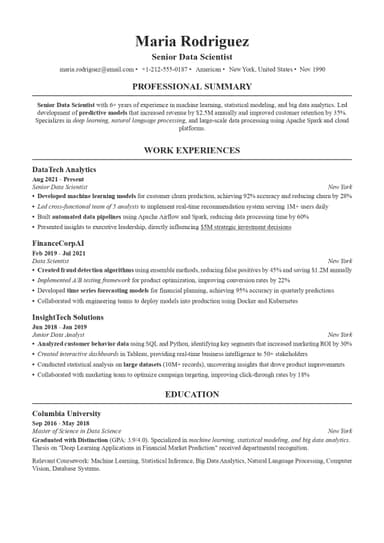
Senior Resume Example

How to Make a Resume: 8 Essential Steps Explained
If you want to make a resume that will leave a lasting impression on recruiters:
#1. Choose the Right Resume Format
Before you write a single word, you need to pick the resume format that'll showcase your background most effectively. There are three main resume formats, and each serves different career situations.
Reverse-Chronological Format
The chronological format is the gold standard and the format most employers prefer and expect. It lists your work experience from most recent to oldest, creating a clear timeline of your career journey.
This format is the best choice if you've got a solid work history in your field and want to show clear career progression. Employers love it because it's familiar, easy to scan, and demonstrates stability.
Functional Format
Meanwhile, the functional format emphasizes your skills over your work history, which makes it useful for specific situations. It's best for career changers trying to pivot industries, folks with employment gaps they'd rather minimize, or people with limited experience.
However, many employers view this format skeptically because it obscures chronological work history and is less compatible with ATS systems.
Combination (Hybrid) Format
This format merges chronological and functional elements, highlighting both your resume skills and your work history. It's ideal for professionals with diverse skill sets or those changing industries while still wanting to show career progression. Therefore, we could say that the combination format balances the best of both worlds, though it requires careful organization.
#2. Add Your Contact Information
Your contact information sits at the top in the resume header. It needs to be clean, professional, and complete.
Start with your full name in the largest, boldest font on your resume. Then include your:
- Phone number
- Professional email address (if you're still using that one from high school, it's time to create something like firstname.lastname@email.com)
- Your city and state (you don't need your full street address anymore, as it just takes up valuable space)
- LinkedIn profile URL
Depending on your field, you might want to include a portfolio website, personal website, professional social media (e.g., Twitter for journalists or Instagram for photographers), or a GitHub profile for tech roles.
Meanwhile, you should skip:
- Photo, unless you're applying internationally, where it's expected, or the employer specifically requests one
- Full street address
- Date of birth
- Marital status
- Social Security Number (SSN)
These details are unnecessary and can actually hurt your chances by introducing potential bias.
Here’s an example of what this section should look like:
Maribel Knox
Interior Designer
Austin, TX, USA
maribel.knox.design@email.com
(512) 555-9824
www.maribelknoxstudio.com
linkedin.com/in/maribelknox
#3. Write a Compelling Resume Summary or Objective
This short resume section, sitting right below your contact information, is your elevator pitch. You've got two options here: writing a resume summary or a resume objective.
Resume Summary
A resume summary is two to four sentences long and highlights your experience, skills, and achievements. It's best for professionals with at least two years of experience who can point to concrete accomplishments.
Include your years of experience, key skills that match the job, notable achievements with numbers, and the value you bring. Tailor this section to each specific job, as generic summaries are wasted space.
Here's a solid structure you can follow: "[Job title] with [X years] experience in [industry/field]. Proven track record of [key achievement with metrics]. Skilled in [top 3-5 relevant skills]. Seeking to apply [expertise] to [value you'll bring to employer]."
For example, you can write something like this:
Marketing Manager with 7+ years of experience in B2B SaaS. Increased lead generation by 145% and reduced customer acquisition cost by 32% through data-driven campaigns. Skilled in marketing automation, content strategy, SEO, analytics, and team leadership. Ready to drive measurable growth for a fast-scaling tech company.
Resume Objective
A resume objective is two to three sentences long and states your career goals and what you bring to the role. It works best for entry-level candidates, career changers, or those with employment gaps.
Include your career objectives, relevant skills you're bringing to the table, and explain what you hope to contribute. The trick here is focusing on what you can offer the employer, not just what you want from them.
Here’s a good example of a resume objective:
Recent marketing graduate with a Bachelor's degree in Marketing and hands-on experience managing social media campaigns for university organizations. Seeking an entry-level Marketing Coordinator position to apply my skills in content creation, analytics, and project coordination while contributing fresh perspectives and digital-native expertise to help grow brand awareness and engagement.
#4. Detail Your Work Experience
The work experience section is where you prove you can do the job, as for most people, work history carries the most weight in hiring decisions.
Here, you should list jobs in reverse chronological order, starting with your most recent or current position. For each job, include your job title, company name, location (city and state), and dates of employment (month and year). Use three to six bullet points per position, focusing on your most recent and relevant experience from the last 10 to 15 years.
Furthermore, start each bullet with a powerful action verb, such as achieved, developed, led, implemented, increased, streamlined, launched, etc. Avoid weak phrases like "responsible for" or "duties included.”
Quantify everything you can since numbers grab attention and provide concrete proof of your impact, and focus on accomplishments and results, not just duties. Use the PAR method (Problem-Action-Result) to structure complex achievements.
Finally, tailor your bullets to match the job description; for example, if the posting emphasizes project management, lead with project management achievements.
Let’s see what a solid work experience section looks like:
WORK EXPERIENCE
Content Editor
Brightwell Media, Chicago, IL
March 2020 – Present
- Edit and proofread 20–30 articles per month across lifestyle, business, and technology topics
- Ensure accuracy, tone consistency, and brand alignment across all published content
- Apply SEO best practices, including keyword optimisation, internal linking, and metadata editing
- Collaborate with writers, designers, and marketing teams to improve structure and engagement
- Reduced post-publication corrections by 25% through improved editorial review processes
- Updated and refreshed legacy content, contributing to improved search visibility
Editorial Assistant
North Bridge Publishing, Milwaukee, WI
June 2018 – February 2020
- Assisted senior editors in reviewing manuscripts, blog content, and marketing materials
- Conducted fact-checking and copyediting for print and digital publications
- Prepared documents for CMS upload and publication
- Maintained editorial calendars and tracked production timelines
- Communicated feedback to freelance contributors and in-house writers
Challenges Writing a Work Experience Section + Solutions
Here are some challenges you may face while writing this section and the best ways to resolve them:
- Limited experience. Include internships, volunteer work, relevant coursework, academic projects, or freelance gigs. These all demonstrate skills and a work ethic.
- Career gaps. Use a functional format or address the gap honestly with a brief explanation if needed. Most gaps aren't as concerning to employers as you think, especially recent ones.
- Changing careers. Emphasize transferable skills that apply to your target role. Show how your past experience, even in a different field, prepared you for this next step.
#5. Include Your Education
How you present your education depends heavily on where you are in your career.
For Recent Graduates
If you graduated within the last 2-3 years, place your education section near the top of your resume, right after your career summary. Include your degree, major and minor, university name and location, and graduation date. Add your GPA if it's 3.5 or higher (otherwise, leave it off).
You can also mention relevant coursework that directly relates to the job, academic honors like Dean's List or scholarships, and thesis or capstone projects that demonstrate relevant skills. Relevant extracurriculars and leadership roles that show soft skills count, too.
For Experienced Professionals
Once you've been working for a few years, your education section moves below your work experience. At this stage, include just the essentials: degree, field of study, university name, and graduation year. You can drop your GPA, coursework descriptions, and most activities unless they're highly relevant to the position you're targeting.
Certifications and Continuing Education
If you've got multiple relevant certifications, create a separate section for them, and mention the certification name, issuing organization, date you obtained it, and expiration date if applicable. Professional development shows you're keeping your skills current, which matters more than ever in fast-changing fields.
This is an example of a well-written education section:
EDUCATION
BA in English
University of Wisconsin, Madison, Madison, WI
2014 – 2018
#6. Showcase Your Skills
Your skills section is where you directly match yourself to the job requirements; still, you need to be strategic about what you include and how you present it.
Hard Skills
Hard skills are technical abilities and specific knowledge that you can measure or test.
Examples include software proficiency (Adobe Creative Suite, Salesforce, AutoCAD), programming languages (Python, JavaScript, SQL), data analysis tools (Excel, Tableau, R), foreign languages with proficiency levels, and industry-specific tools or methodologies.
These should directly match job description requirements. Don't list every software program you've ever touched; focus on what's relevant to this specific role and what you're genuinely proficient in.
Soft Skills
Soft skills are interpersonal and behavioral abilities like communication, leadership, problem-solving, teamwork, time management, and adaptability.
You shouldn’t just list soft skills in this section; you need to demonstrate them through your work experience bullets. Saying you're a "strong leader" means nothing, but showing that you "led a cross-functional team of 12 to deliver a complex project 3 weeks ahead of schedule" proves leadership.
Create a dedicated "Skills" section with 8-12 relevant skills that match the job posting and put each in a separate category to organize them better. Additionally, match keywords from the job description strategically—this helps you pass ATS screening.
An example of what this section looks like is this:
SKILLS
Hard Skills
- Editing & proofreading
- SEO content optimisation
- Fact-checking
- CMS publishing (WordPress)
- Style guide adherence
Soft Skills
- Attention to detail
- Deadline management
- Clear written communication
- Collaboration
#7. Add Optional Sections (When Relevant)
These additional sections can strengthen your resume, but only include them if they're truly relevant and impressive:
Professional Projects
Include significant projects that demonstrate your abilities, especially valuable for career changers or those with limited work experience. List the project name, your role, technologies or methods used, and measurable outcomes.
Volunteer Experience
Relevant volunteer work shows character and can fill employment gaps nicely. Format it like work experience with the organization name, your role, dates, and accomplishments with metrics when possible. This is particularly valuable when applying to nonprofits or socially-conscious companies.
Languages
List languages with specific proficiency levels: Native, Fluent, Professional Working Proficiency, Limited Working Proficiency, or Basic. It’s usually useful for international companies or roles requiring bilingual skills.
Awards and Honors
Mention relevant professional awards, academic honors, or industry recognition. Also, add brief context if the award isn't self-explanatory. Something like: "Winner, 2024 Regional Sales Excellence Award (Top 1% of 500+ sales representatives)" tells a much better story than just listing the award name.
Publications and Presentations
For academic, research, or thought leadership roles, it’s crucial to emphasize your success with publications and presentations. Use proper citation format and don’t forget to include the publication name, date, and a link if available online.
#8. Format and Proofread Your Resume
To properly format your resume, you need to:
- Use professional, readable fonts, such as Arial, Calibri, Helvetica, or Times New Roman in 10-12 point size.
- Maintain absolutely consistent formatting throughout—same date format, same bullet style, same spacing.
- Use 0.5 to 1 inch margins on all sides
- Include adequate white space so your resume doesn't look like a dense wall of text. Stick to black text on a white background (or very light gray) unless you're in a creative field where subtle color is expected.
- Save your final version as a PDF to preserve formatting, unless the ATS specifically requires .docx format.
- Keep to one page if you have less than 10 years of experience; two pages maximum for more extensive backgrounds.
5 Common Resume Mistakes to Avoid
Let’s get familiar with some of the most common resume mistakes out there:
Every single line on your resume should support your candidacy for this specific role. Avoid listing unrelated jobs from 20 years ago, outdated skills that are no longer industry-standard, or personal information like age, marital status, or photo (unless specifically required for international job applications or modeling/acting roles).
Sending the same resume to every job might save time, but it tanks your results. You should tailor your resume for each application by:
- Customizing your resume summary to match the role
- Adjusting your skills section to prioritize what they're looking for
- Rewriting or reordering experience bullets to emphasize relevant achievements
Generic resumes rarely make it past ATS, and even when they do, they don't catch hiring managers' attention.
Listing what you were supposed to do (responsibilities) tells employers nothing about how well you did it. However, highlighting what you actually accomplished proves your value, so make sure you always quantify results with numbers, percentages, timeframes, or specific outcomes.
Don't get creative with your resume format unless you're in a genuinely creative field where it's expected. Avoid overly decorative designs, multiple columns that confuse ATS, tiny resume fonts (under 10pt) that strain readers' eyes, or cluttered layouts with no white space. Instead, stick to clean, professional formatting that's easy to read by both humans and machines.
Even a single typo signals carelessness to employers and suggests that if you can't take the time to proofread a one-page document about yourself, you probably won't pay attention to details on the job.
Therefore, you should proofread multiple times, at different times of day when your brain is fresh. Use a grammar checker such as Grammarly or Hemingway and, if possible, have friends, family, or career counselors review your resume with fresh eyes.
4 Expert Resume Tips You Should Consider
Here's what recruiters and hiring managers wish job seekers knew:
- Lead with your strongest qualifications. Recruiters spend just a few seconds scanning resumes initially, focusing on the top third of your resume first. Place your most impressive achievements and relevant experience at the top where they'll be seen immediately. If you bury your best stuff on page two, it might never get read.
- Keep it concise and scanable. Use short bullet points (1-2 lines each), plenty of white space between sections, and clear section headers. Avoid dense paragraphs that make readers' eyes glaze over, to make it easy for recruiters to quickly identify your key qualifications.
- Update your resume regularly. Don't wait until you desperately need a job to update your resume. Add new skills, achievements, and responsibilities as you gain them throughout the year. Additionally, keep a master document with all your experiences, projects, and accomplishments, then customize shorter versions for specific applications.
- Pair your resume with a solid cover letter. A tailored cover letter complements your resume by providing context, demonstrating genuine enthusiasm for the role, and explaining how you're a perfect fit for both the position and company culture. While some employers don't read cover letters, many do, and a strong one can be the tiebreaker between you and another qualified candidate.
Use ResumeBuilder.so to Create a Flawless Resume
Formatting a resume from scratch is a pain, as you may spend hours fighting with margins, bullet points, and spacing, and it may still not look quite right.
Luckily, our resume builder eliminates formatting headaches entirely, ensures ATS compatibility, and provides expert guidance throughout the creation process. You can create a professional resume in 15-20 minutes rather than 3-4 hours of frustration!
Our platform offers pre-designed templates created by professionals who understand what employers want. AI-generated content suggestions based on your specific role help you articulate your experience better, while built-in optimization ensures proper keyword density and formatting for ATS systems.
All you should do is:
- Choose from professionally designed templates suited to your industry and experience level.
- Fill in your details with guided prompts that walk you through each section. The AI assists with writing compelling bullets and summaries based on your job title and experience level.
- Rearrange sections, add or remove elements, and fine-tune the content until it's exactly right.
- Download your finished resume in your preferred format and start applying with confidence!
Final Thoughts
Making a resume doesn't have to feel like an insurmountable challenge. By choosing the right format, including all essential sections, tailoring content to each job, and optimizing for both ATS and human readers, you'll create a document that opens doors.
You don't have to figure it all out alone. ResumeBuilder.so provides the tools, templates, and AI-powered guidance to create a professional, ATS-friendly resume that showcases your unique qualifications effectively. Start building your standout resume with our resume builder today, and your future self will thank you!
How to Make a Resume FAQs

Max Harper is the resume guru who actually makes job searching easier. With years of experience as a hiring manager, Max knows what makes a resume stand out in a pile of 200+ applications. From breaking down ATS myths to helping you craft bullet points that pop, Max shares easy-to-digest, no-BS resume advice.