13+ Essential ATS Tips to Beat Resume Screening in 2026

Mastering ATS tips is essential for job search success in 2026 since over 90% of large companies use applicant tracking systems to filter resumes before they reach recruiters. If your resume isn’t optimized for these systems, it can disappear into the void no matter how strong your skills are. Therefore, understanding how to create an ATS-friendly resume can separate you from hundreds of other applicants.
In this guide, you’ll learn how to structure, format, and optimize your resume to beat automated screening, increase visibility, and finally get your application in front of recruiters. Let’s begin!
- Applicant tracking systems scan and filter resumes before human review, making optimization critical for landing interviews.
- Proper formatting and strategic keyword usage form the foundation of ATS-friendly resumes.
- Simple, clean resume templates outperform complex designs when ATS software analyzes applications.
- Standard section headings help systems correctly parse your information.
- File format matters—certain formats are more ATS-compatible than others.
- Testing your resume with ATS checkers identifies issues before submitting.
What Is an Applicant Tracking System (ATS)?
An applicant tracking system is software that automatically scans, parses, and ranks resumes based on how well they match job requirements. Companies use these systems because they receive hundreds of applications per position. In fact, over 97% of Fortune 500 companies use ATS software to manage their hiring processes, and many resumes never reach human eyes because they're filtered out at the ATS stage.
Also, major corporations like Amazon, Google, Microsoft, and JPMorgan Chase all rely on sophisticated ATS platforms to handle the massive volume of applications they receive. This means that whether you're applying to a global enterprise or a growing startup, your resume will likely encounter an ATS before it reaches the recruiter.
How ATS Works?

The system extracts information from your resume—contact details, work history, education, skills—and organizes it into a standardized format. Then it searches for specific keywords from the job description, ranks candidates based on relevance, and presents top matches to human recruiters.
Here’s a quick breakdown of the ATS scanning process:
- Parsing. The system breaks down your resume into data fields, extracting text from various sections and categorizing information like your name, email, job titles, employment dates, credentials, and skills. This is where formatting problems can cause critical information to be misread or missed entirely.
- Keyword matching. The ATS compares the parsed content against the job description, searching for specific keywords, phrases, skills and qualifications, and experience markers that the employer has designated as important. Resumes with higher keyword matches typically score better.
- Ranking and filtering. Based on the keyword analysis and other criteria (like years of experience or education level), the system assigns each resume a score or ranking. Recruiters then review only the top-scoring candidates, meaning a low ATS score can eliminate you from consideration.
- Database storage. Your resume is stored in the company's talent database, where recruiters can search for candidates by keywords, skills, or qualifications for current and future openings.
13+ Essential ATS Tips for Your Resume
These proven ATS tips will help you write your resume to pass automated screening and reach human recruiters. Let’s examine each one in moe detail.
#1. Use Standard Resume Section Headers
Use standard resume section headers because ATS systems rely on recognizing conventional headings to properly categorize information. When you label your work history as "Professional Experience," the software knows exactly where to look. On the other hand, creative headings like "My Journey" confuse parsing algorithms.
Take a look at the following good and bad examples:
- Professional Experience
- Work Experience
- Employment History
- Education
- Skills
- Certifications
- Professional Summary
- Summary
ATS-Unfriendly Resume Headers
- My Journey
- Where I’ve Been
- Career Highlights
- Academic Path
- What I Bring to the Table
- Extra Credentials
- About Me
- Snapshot
#2. Choose the Right File Format
Choose the right file format because .docx and .pdf formats are most ATS-compatible. While PDFs preserve formatting, some older ATS platforms struggle to parse them correctly. Microsoft Word documents (.docx) are generally the safest choice unless the job posting specifies otherwise.
On the other hand, never use .pages files, .jpg or .png images, or uncommon formats like .odt. These either won't upload at all or will cause major parsing errors. Similarly, avoid .txt files because they strip all formatting.
#3. Select an ATS-Friendly Resume Template
Select an ATS-friendly resume template because simple, single-column layouts work best for automated scanning. Templates with multiple columns and complicated resume design may jumble your information across columns since ATS systems read from left to right.
Also, avoid tables, text boxes, headers, footers, and graphics because these confuse parsing software, causing it to scramble or skip sections entirely.
#4. Incorporate Relevant Keywords Strategically
Identify terms from job descriptions and weave them naturally throughout your resume. Keywords are the bridge between what employers want and what you're offering. The ATS searches for specific terms and ranks your resume based on relevant matches.
Start by carefully reading the job description and highlighting repeated terms. Let’s see how this looks like in a real job advertisement for a senior react developer:
We are seeking an experienced Senior React Developer to join our growing engineering team. You'll be responsible for designing, developing, and maintaining scalable web applications while mentoring junior developers and contributing to our technical architecture decisions.
Key Responsibilities:
- Design and develop full-stack applications using React, Node.js, and Python
- Write clean, maintainable, and testable code following best practices
- Implement RESTful APIs and microservices architecture
- Conduct code reviews and provide technical mentorship to team members
- Collaborate with cross-functional teams including product managers and designers
- Optimize application performance and ensure scalability
- Participate in Agile/Scrum ceremonies and sprint planning
- Troubleshoot and debug complex technical issues in production environments
- Contribute to CI/CD pipeline development and DevOps practices
Required Qualifications:
- Bachelor's degree in Computer Science, Software Engineering, or related field
- 5+ years of professional software development experience
- Strong proficiency in JavaScript, TypeScript, and Python
- Extensive experience with React and modern front-end frameworks
- Solid understanding of backend development with Node.js or similar
- Experience with SQL and NoSQL databases (PostgreSQL, MongoDB)
- Proficiency with Git and version control workflows
- Knowledge of cloud platforms (AWS, Azure, or GCP)
- Experience with Docker and Kubernetes
- Strong problem-solving skills and attention to detail
Preferred Qualifications:
- Master's degree in Computer Science or related field
- Experience with GraphQL and WebSocket technologies
- Familiarity with test-driven development (TDD) and unit testing frameworks
- Knowledge of system design and software architecture patterns
- Experience with monitoring tools like Datadog or New Relic
- Contributions to open-source projects
- AWS certifications or equivalent cloud certifications
What We Offer:
- Competitive salary and equity package
- Comprehensive health, dental, and vision insurance
- 401(k) matching
- Professional development opportunities
- Flexible work arrangements
The highlighted words in the job ad are keywords you should use in your resume. Place them in your resume summary, skills section, and work experience. However, use them naturally—keyword stuffing makes your resume sound robotic and can hurt your score.
#5. Optimize Your Resume for Each Job Application
Optimize your resume for each job application because generic resumes score lower than customized versions. This doesn't mean completely rewriting everything—it means making targeted adjustments to match specific requirements.
For each application, customize your professional summary, skills section, and achievements in your most relevant positions. This approach increases your chances of passing ATS screening.
#6. Use Standard Fonts and Formatting
Use standard resume fonts and formatting because fancy fonts cause parsing errors. Stick with professional fonts like Arial, Calibri, Georgia, or Times New Roman in 10-12 point size. You can use bold text for headings and italics for company names, but avoid underlining text—it can confuse character recognition.
Keep formatting consistent throughout. If you bold all job titles, bold them all. Mixed formatting looks sloppy and can cause the software to categorize information incorrectly. Black text on white background is the safest choice.
#7. Include a Skills Section With Hard and Soft Skills
Include both hard skills, such as programming languages or software proficiency, and soft skills, like communication or leadership, from the job description. This helps ATS quickly identify your qualifications.
Also, format your skills section with bullet points for easy scanning. However, don't list every skill you've ever acquired—focus on skills relevant to your target position.
#8. Spell Out Acronyms and Abbreviations
Spell out acronyms and abbreviations because ATS systems may search for either version. Write "Search Engine Optimization (SEO)" the first time, then use "SEO" alone subsequently. This is especially important for certifications and technical skills. For example, "Project Management Professional (PMP)" captures searches for both terms.
#9. Use Standard Date Formats
The ATS needs clear, recognizable date patterns to calculate your total years of experience and employment gaps. When dates are formatted inconsistently or unconventionally, the system may fail to extract them correctly, potentially misrepresenting your work history or flagging you as having unexplained employment gaps.
Here are a few good examples of date formatting:
- January 2023 - Present
- 01/2023 - Present
- Jan 2023 - Dec 2024
- 2023 - 2024
Regardless of which format you choose, apply it consistently across all employment entries, education credentials, and certifications to ensure the ATS can properly sequence your experience timeline.
#10. Use Bullet Points for Work Experience
Use bullet points for work experience on resume because they improve both ATS parsing and readability. Bullet points create clear visual breaks that help ATS software identify distinct achievements and responsibilities.
Start each bullet with a strong action verb, such as managed, developed, increased, implemented, led, optimized, designed, launched, or achieved. These power verbs immediately convey your active role and impact.
Here are some strong examples of work experience bullet points:
- Managed 5 social media accounts, increasing follower engagement by 145% and driving 12,000+ monthly website visits
- Developed and launched 8 multi-channel marketing campaigns that generated $2.3M in revenue and reduced customer acquisition cost by 32%
- Resolved 50+ customer inquiries daily with 98% satisfaction rating, improving response time from 24 hours to 2 hours
#11. Include Relevant Certifications and Education
Include relevant certifications and education because these qualifications often serve as initial screening criteria. Format your education section with complete information:
- Degree name
- Institution name
- Location
- Graduation date
Certifications deserve prominent placement. Include the following:
- Full certification name (not just abbreviations)
- Issuing organization
- Date obtained or renewal date if applicable
Place them in a dedicated "Certifications" or "Professional Certifications" section rather than burying them in work experience.
That said, let’s see a good example of education and certification sections on resume:
Education
Bachelor of Science in Computer Science
University of Texas at Austin, Austin, TX
May 2019
GPA: 3.8/4.0
Certifications
- Project Management Professional (PMP), Project Management Institute, 2023
- Certified ScrumMaster (CSM), Scrum Alliance, 2022
- AWS Certified Solutions Architect – Associate, Amazon Web Services, 2024
- Google Analytics Individual Qualification (GAIQ), Google, 2023
#12. Use Standard Job Titles
Use standard job titles because ATS systems search for industry-recognized terms that match their database of known positions. Creative or company-specific titles like "Sales Ninja," "Code Wizard," or "Customer Happiness Guru" may reflect company culture, but they confuse ATS algorithms.
If your official title is unconventional but you're performing standard industry functions, list your official title first for accuracy, then add the standard equivalent in parentheses. This maintains honesty and ensures ATS systems recognize your role and match you to relevant job openings.
Here’s how that might look on your resume:
Digital Prophet (Marketing Analytics Manager)
TrendyTech Startup, San Francisco, CA
March 2021 - Present
- Analyzed marketing data using Google Analytics and Tableau to identify growth opportunities
- Developed predictive models that increased campaign ROI by 47%
- Led cross-functional team of 6 marketing professionals
#13. Optimize Your Resume File Name
A professional file name helps recruiters quickly identify your resume when they've downloaded dozens of files, maintains professionalism if your resume gets forwarded internally, and ensures your document doesn't get lost in a folder full of identically named "Resume.pdf" files from other candidates.
To name your resume file, follow these key rules:
- Use hyphens (-) instead of spaces or underscores for better compatibility
- Include your full name as it appears on your resume
- Avoid special characters like @, #, !, %, &, or * that may cause technical issues
- Keep it under 50 characters for universal compatibility
- Use consistent capitalization (typically capitalize proper nouns)
- Add the job title or company name if you're submitting multiple tailored versions
Now, let’s see how this looks in practice:
- FirstName-LastName-Resume.docx (e.g., "Michael-Chen-Resume.docx")
- FirstName-LastName-Job-Title.pdf (e.g., "Jessica-Martinez-Software-Engineer.pdf")
- FirstName-LastName-Company-Name.docx (e.g., "David-Thompson-Google-Application.docx")
#14. Test Your Resume With an ATS Checker
Test your resume with an ATS checker before submitting because these tools identify formatting issues, missing keywords, and parsing problems that could cause your resume to be rejected.
These tools simulate how actual applicant tracking systems will read and score your resume. They reveal critical issues like sections that failed to parse correctly, important keywords you're missing from the job description, formatting elements that confuse the scanner, and an overall match score that predicts your likelihood of passing the initial screening.
3 Common ATS Mistakes to Avoid
Understanding what not to do is just as important as knowing what to do. Here are three frequent ATS mistakes that cause resume rejections and how to avoid them:
- Using complex graphics and images. Graphics, logos, photos, and images can't be parsed by ATS systems and will cause poor scores. What you see as a sleek infographic appears as blank space to the ATS. Stick to text-based descriptions with bullet points.
- Creating multi-column layouts. Two or three-column resume layouts scramble into nonsensical order because the software reads left to right, top to bottom. Single-column formats ensure the ATS reads information in the correct order.
- Forgetting to update keywords for different roles. Sending the same resume to every posting is a major mistake. Take fifteen minutes to adjust your keywords, summary, and relevant bullet points for each application.
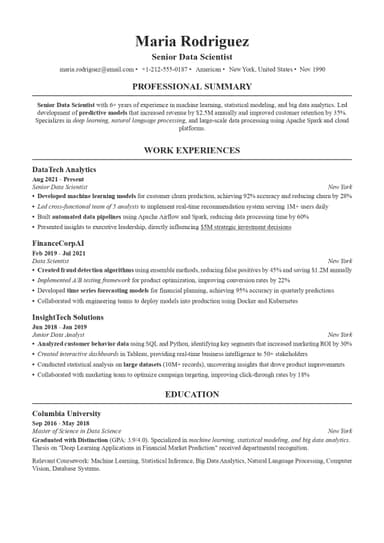
ATS-Friendly Resume Example
Now that we’ve covered everything you need to know about ATS optimization, here’s a fully optimized resume example you can use for inspiration:

Create an ATS-Friendly Resume With ResumeBuilder.so
Our platform streamlines the entire process with an AI-powered resume builder that automatically implements ATS best practices. As you build your resume, the system provides content suggestions incorporating relevant keywords, flagging potential issues before submission.
ResumeBuilder.so eliminates guesswork by offering pre-formatted, ATS-compliant templates that use simple layouts, standard fonts, and single-column designs proven to parse correctly across all major applicant tracking systems. You don't need to worry about accidentally using incompatible formatting elements—every template is optimized for both ATS readability and visual appeal to human recruiters.
Final Thoughts
Getting past applicant tracking systems doesn't require insider secrets—just smart optimization based on understanding how these systems work. Start by implementing the fundamentals: choose the right file format, use a clean template, include standard section headings, and place contact information in the main body. Then layer in strategic optimization: customize keywords for each application, include both acronyms and full terms, demonstrate impact with quantifiable achievements, and test your resume before submitting.
The job search is challenging enough without your resume getting automatically rejected before anyone reads it. Our ATS tips ensure your qualifications actually get seen and considered. Your skills and experience matter—make sure they're presented in a format that gives you the best chance of landing interviews.
ATS Tips FAQs

Maya Brooks believes that a fulfilling career shouldn’t come at the cost of your mental health. Having worked in corporate HR, she’s seen firsthand how burnout culture can wreck careers. Now, she shares real-world strategies for setting work boundaries, avoiding toxic workplaces, and finding joy in your job.