Administrative Assistant Resume: Examples & Writing Steps
This complete guide with detailed explanations and expert tips will teach you how to write an acting resume in record time!
Edit this resume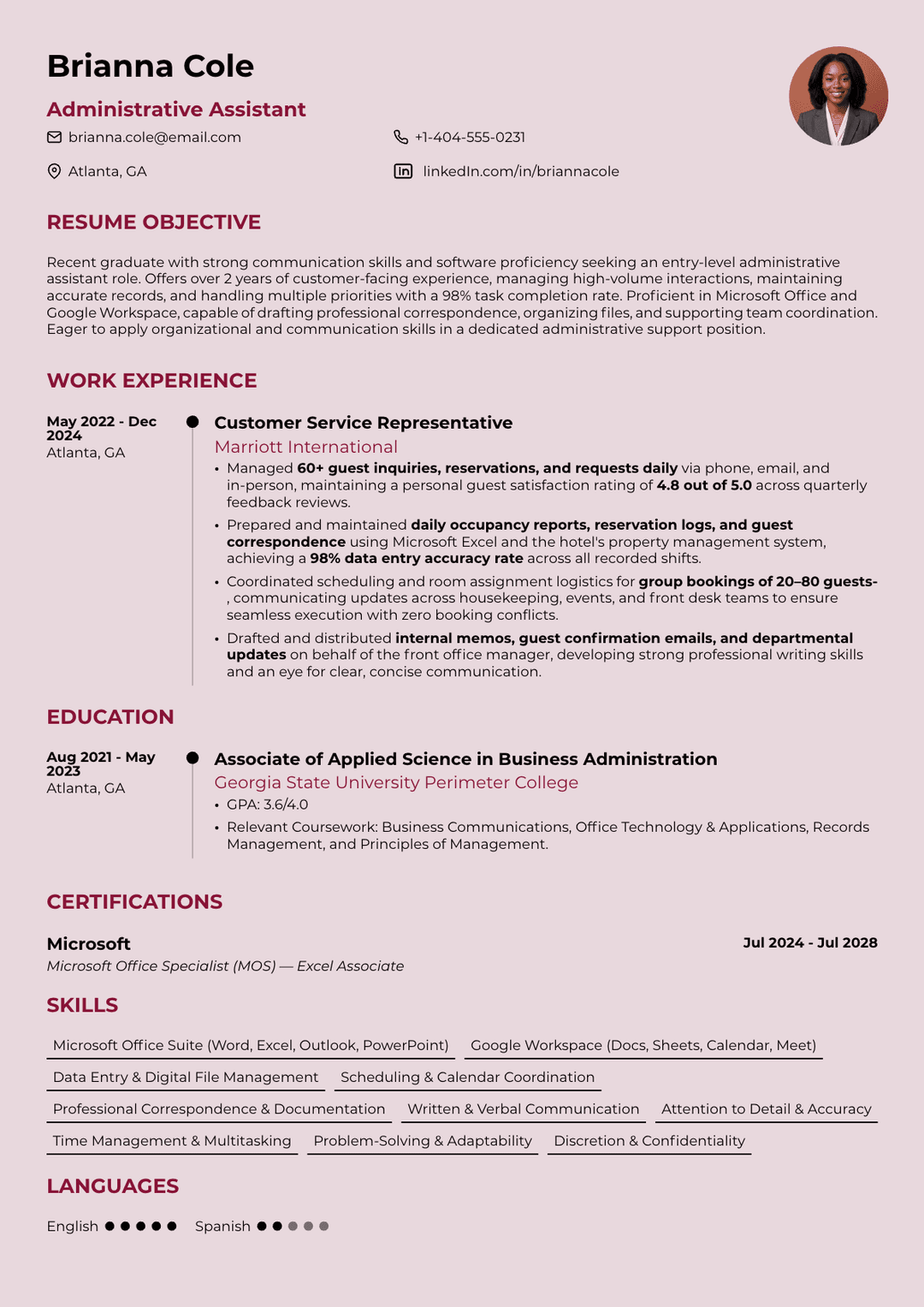
An administrative assistant resume is a job application document that summarizes your office support experience, organizational skills, and ability to handle the day-to-day tasks that keep a workplace running smoothly.
Also, its purpose is to show employers that you can manage schedules, prepare documents, communicate professionally, and support teams without letting important details slip through the cracks.
Today, we’ll walk you through the process of drafting a resume for an office assistant that feels clear, focused, and relevant to the role you want. You’ll learn how to present your experience in a way that shows real value, choose skills that match administrative work, and structure each section so hiring managers can quickly see why you’re a reliable fit.
- An administrative assistant resume should clearly show your office support experience, organizational skills, communication abilities, and ability to keep daily operations running smoothly.
- The reverse-chronological format is the best choice for most administrative assistant resumes because it is ATS-friendly and gives hiring managers a clear view of your most recent experience.
- Strong work experience bullet points should start with action verbs and include measurable results, such as the number of meetings scheduled, calls handled, documents prepared, or processes improved.
- Your skills section should be tailored to the job description and include relevant hard skills, such as Microsoft Office, Google Workspace, CRM software, data entry, and scheduling tools.
- Entry-level candidates can still write a strong resume by focusing on transferable skills, internships, volunteer work, software proficiency, and examples that show reliability, organization, and professionalism.
What Does an Administrative Assistant Do?
An administrative assistant keeps an office running smoothly by handling scheduling, correspondence, data entry, documentation, and day-to-day coordination between teams or executives. The projected job growth for administrative assistants is 0%, with median annual salaries around $47,460, depending on industry, location, and experience level.
The role is broader than most people expect. Some administrative assistant positions are primarily clerical, focused on answering phones and managing files. Others, meanwhile, operate at a near-executive level, where you might coordinate international travel, manage sensitive communications, or oversee project timelines.
That range matters when you're writing your resume. For instance, a role supporting a small dental office looks very different from one supporting a VP at a Fortune 500 company, even if both are technically "administrative assistant" positions. The document needs to reflect the specific demands of the job you're actually applying for with no generic content.
Administrative Assistant Resume Example
Before breaking down every section, it helps to see what a strong finished resume actually looks like. Below are a few realistic examples that can give you an idea about how the final version of your resume draft should be.
Entry-Level Administrative Assistant Resume Example

Executive Administrative Assistant Resume Example

How to Write an Administrative Assistant Resume
To write an administrative assistant resume properly, you should break it into sections and tackle each one deliberately. Here's how to approach every part step by step:
#1. Choose the Right Resume Format
You can choose the right resume format for your administrative assistant resume by first considering how much relevant experience you have and whether your career path has been linear.
There are three main options here:
- Reverse-chronological: lists your most recent job first and works best for most applicants because it's straightforward, familiar to hiring managers, and fully compatible with ATS.
- Functional format: groups skills rather than jobs chronologically and can work for career changers or candidates with gaps, but many ATS systems struggle to parse it correctly.
- Combination resume: blends both approaches, leading with a skills summary followed by a chronological work history. It might be useful if you're pivoting into administrative work from a different field.
For the vast majority of administrative assistant applicants, reverse-chronological is the right call; it's the format hiring managers expect, and it gives your experience the most visibility.
#2. Write an Administrative Assistant Resume Summary or Objective
A resume summary for an administrative assistant should capture your most relevant experience, top skills, and professional value in two to three sentences.
It works best if you have at least two or three years of experience because it highlights what you bring to the table. On the other hand, if you’re an entry-level candidate or a career changer, it’s better to write a resume objective. This variation focuses on what you're aiming to contribute rather than what you've already done.
Let’s see an example of a good resume summary for this role:
Detail-oriented administrative assistant with 5+ years supporting C-suite executives in fast-paced environments. Skilled in calendar management, travel coordination, and cross-departmental communication.
Meanwhile, here’s what an administrative assistant resume objective looks like:
Recent graduate with strong organizational and communication skills seeking an entry-level administrative assistant role to contribute to office efficiency at [Company].
Keep your resume summary tight and specific, since vague openers like "motivated professional looking for an opportunity" tell the reader nothing.
#3. Highlight Your Work Experience
Your work experience section should demonstrate what you actually accomplished. Format this section in reverse-chronological order, and for each role, include the company name, your job title, dates of employment, and location.
Then list your responsibilities and achievements as bullet points, starting each one with an action verb. Whenever possible, attach a number to your work; you don't have to be precise to the decimal; even rough estimates (e.g., "supported a team of approximately 15 staff") are better than nothing.
An example looks like this:
Work Experience
Administrative Assistant
Northline Property Group, Chicago, IL
March 2021 – Present
- Managed calendars for 4 department managers, scheduling 35+ meetings, property visits, and vendor appointments each week.
- Prepared reports, client documents, meeting agendas, and internal memos with 98% accuracy.
- Coordinated travel arrangements, expense reports, and conference registrations for a 25-person office.
- Organized digital and physical filing systems, reducing document retrieval time by 30%.
- Answered and routed an average of 60+ calls and emails per day while maintaining a professional client experience.
- Tracked office supply inventory and negotiated with vendors, helping reduce monthly supply costs by 12%.
- Assisted with onboarding paperwork for 20+ new employees, ensuring all required forms were completed on time.
- Updated spreadsheets, databases, and contact lists using Microsoft Excel, Google Sheets, and CRM software.
#4. List Your Education
The education section of an administrative assistant resume should include your highest completed degree or diploma, the institution name, and your graduation year.
Most administrative assistant positions require at least a high school diploma, though an associate or bachelor's degree (often in business, communications, or a related field) can strengthen your candidacy.
If you graduated recently with a GPA above 3.5, this information is worth including. Relevant coursework, such as business writing, accounting basics, or office technology, is worth mentioning as well, especially if you're light on work experience.
Additionally, certifications fit naturally at the bottom of this section or in a separate certifications block. Don't overthink the structure, but make sure you mention the issuing body and the expiration year.
Adding these to your administrative assistant resume can set you apart, especially in competitive markets where many candidates share similar experience levels.
The Certified Administrative Professional (CAP) credential from the International Association of Administrative Professionals is the most recognized in the field. Additionally, the Microsoft Office Specialist (MOS) certification works, too, as it's widely recognized and easy to verify. Plus, if you work in specialized environments, role-specific certifications can give you a clear edge.
Now, this is how these two sections could appear on a resume:
Education
Associate of Applied Science in Business Administration
Harold Washington College, Chicago, IL
Graduated: 2016
Certifications
- Microsoft Office Specialist: Excel Associate, Microsoft. Expires 2028
- Certified Administrative Professional, International Association of Administrative Professionals. Expires 2029
#5. Showcase the Right Administrative Assistant Resume Skills
This part is one of the most ATS-sensitive parts of your resume. If you're applying for a position in a company that uses applicant tracking systems in hiring, the list of your skills needs to include the exact terminology the employer uses.
That said, the abilities you emphasize should also shift depending on the type of administrative role, so:
- An executive assistant position will weigh discretion, complex scheduling, and executive communication more heavily
- A medical administrative assistant role will require familiarity with healthcare software, patient confidentiality, and medical terminology
- A legal admin role might prioritize document management, court filing procedures, and billing software
Tailor accordingly, and don't list skills you can't actually demonstrate in an interview. If you put "advanced Excel" on your resume, expect a hiring manager to ask you about pivot tables. If you don’t know anything about it, this may eliminate you completely from the hiring process.
Some important hard skills hiring managers look for in administrative assistants include:
- Microsoft Office Suite (Word, Excel, Outlook, PowerPoint)
- Google Workspace (Docs, Sheets, Calendar, Meet)
- Scheduling tools like Calendly or Asana
- CRM platforms like Salesforce
- Data entry and database management
- Bookkeeping basics
- Typing speed (60+ WPM is competitive)
Additionally, there are soft skills worth highlighting, such as:
- Written and verbal communication
- Attention to detail
- Time management and multitasking
- Discretion and confidentiality
- Problem-solving under pressure
The single most effective strategy for your skills section is to pull exact phrases from the job description. For instance, if the posting mentions "Salesforce CRM," you should list it exactly that way. Also, understanding the hard skills vs. soft skills difference and how to balance them makes a real difference in how an ATS reads your resume.
#6. Add Optional Sections
Optional sections that can genuinely strengthen your resume include:
- Languages (especially if the role involves international communication)
- Professional memberships (IAAP, for example)
- Volunteer experience
- Awards (such as those provided by the American Society of Administrative Professionals)
Keep these concise, because a cluttered resume can significantly decrease your chances of passing the ATS scan and catching the recruiter's attention.
Entry-Level Administrative Assistant Resume Tips
You can write a strong entry-level administrative assistant resume by shifting focus from "where I've worked" to "what I can do", because the two aren't the same thing.
The no-experience challenge is real, but it's also manageable. Most hiring managers hiring at the entry level know they're getting someone who's still building their career. What they're really evaluating is whether you can be trusted, whether you're organized, and whether you can learn quickly, and your resume should demonstrate all three.
Therefore, you should lean on:
- Internships (even short ones)
- Temporary or seasonal work
- Campus organization leadership
- Customer service roles
- Any project (academic or personal) where you had to manage schedules, communicate professionally, or handle information carefully
Also, as previously mentioned, you should use a resume objective rather than a summary, and highlight software proficiency prominently; most entry-level candidates have it, and it's genuinely valued.
Finally, keep the resume length to one page; this is definitely more than enough for the experience you offer. Everything longer than that will be excessive.
Boost Your Resume in No Time With Our Platform
ResumeBuilder.so can help you write a top-notch administrative assistant resume by guiding you through the entire process from start to finish.
Instead of staring at a blank page, you can choose from professional templates, follow step-by-step prompts, and build each section with a clear purpose. The platform also gives you access to a nice collection of resume examples, so you can see how others structure their job applications and what kind of language works best!
Final Thoughts
If you want to make a good administrative assistant resume, you need the right format, a tailored skills section, quantifiable achievements, and a clean, ATS-friendly layout. None of these requires advanced writing skills, just intention and attention to detail, which, coincidentally, are exactly the qualities employers are hiring you for.
And, as mentioned above, in case you want a shortcut on the formatting side, ResumeBuilder.so takes the guesswork out of layout, structure, and design. The platform's AI-powered suggestions can help you identify strong bullet points and relevant skills based on your job title so that you spend less time on structure and more time on content!
Administrative Assistant Resume FAQ
#1. What should I put on an administrative assistant resume?
You should put a resume summary, work experience, a skills section covering both hard and soft skills, education, and any relevant certifications. It’s also recommended to tailor each section to the specific job description for the best results.
#2. How do I write an administrative assistant resume with no experience?
You can write an administrative assistant resume with no experience by highlighting transferable skills from part-time jobs, internships, or volunteer work. Also, use a resume objective rather than a summary, and focus on the software skills and organizational abilities demonstrated through academic or personal projects.
#3. Should I use a resume template for an administrative assistant position?
Yes, you should use a resume template for an administrative assistant position, as it ensures clean formatting, proper structure, and ATS compatibility. ResumeBuilder.so offers customizable, ATS-friendly resume templates designed for administrative roles that can be completed in minutes!
#4. Do I need a cover letter with my administrative assistant resume?
A cover letter is highly recommended alongside your administrative assistant resume. It lets you expand on specific achievements, explain career transitions, and show enthusiasm for the role, all of which can improve your chances of getting an interview.

Max Harper is the resume guru who actually makes job searching easier. With years of experience as a hiring manager, Max knows what makes a resume stand out in a pile of 200+ applications. From breaking down ATS myths to helping you craft bullet points that pop, Max shares easy-to-digest, no-BS resume advice.