Office Assistant Resume: Examples, Skills & Writing Tips
This complete guide with detailed explanations and expert tips will teach you how to write an acting resume in record time!
Edit this resume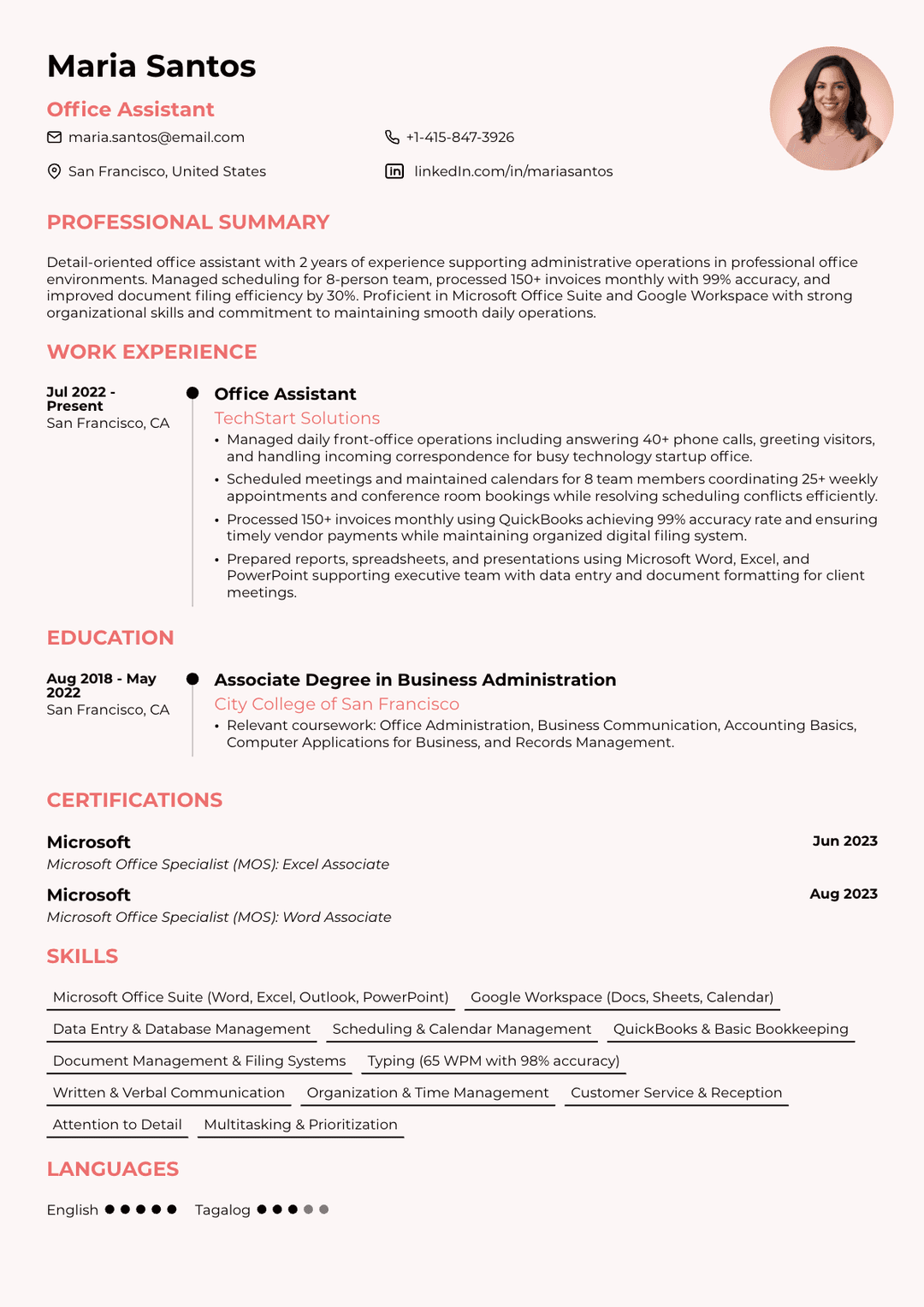
An office assistant resume is a document that highlights your administrative skills, organisational abilities, and experience supporting daily office operations. It shows employers how you handle tasks such as scheduling, document management, customer communication, and general office coordination.
Because office assistants often keep workflows running smoothly behind the scenes, a strong resume helps hiring managers quickly see your reliability, attention to detail, and ability to manage multiple responsibilities.
This guide covers everything you need: real examples, a step-by-step writing process, the skills to highlight, and some valuable tips for polishing your document.
- An office assistant resume focuses on administrative efficiency, showing how you support daily operations through scheduling, document management, communication, and coordination.
- The reverse-chronological format works best for most candidates because it clearly shows recent administrative experience and is easiest for recruiters and ATS systems to scan.
- Strong summaries and bullet points should highlight measurable results (such as invoices processed, calendars managed, or workflow improvements) rather than listing routine duties.
- Employers expect a mix of technical skills (Microsoft Office, data entry, scheduling tools, document systems) and soft skills (organisation, communication, attention to detail, multitasking).
- Clean formatting, one-page length, tailored keywords from the job description, and careful proofreading are essential because office roles demand precision and reliability.
What Is an Office Assistant Resume?
An office assistant resume is a job application document that features all the skills, work history, and qualifications you need for this role. Its purpose is to convince hiring managers that you can perform the essential and advanced office tasks, from scheduling and filing to data entry and supply management.
What makes it different from a general administrative resume is its specificity. A generic admin resume casts a wide net, while an office assistant one targets the day-to-day support functions that keep an office running. It also hits the sweet spot by covering both the technical competencies employers expect and the interpersonal qualities that make you dependable and easy to work with.
4 Office Assistant Resume Examples by Career Level/Variation
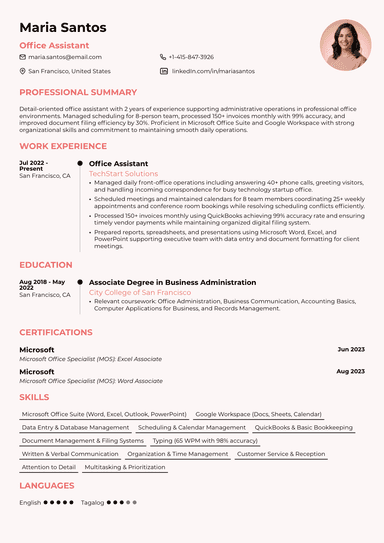
First, let’s have a look at four solid office assistant resume examples based on different experience levels and variations:
#1. Entry-Level Office Assistant Resume Example

#2. Experienced Office Assistant Resume Example

#3. Office Assistant Resume with No Experience

#4. Office Clerk / Administrative Assistant Resume Example

How to Write an Optimal Office Assistant Resume in 7 Easy Steps
To write an optimal office assistant resume, you need to break the process into the following steps:
#1. Choose the Right Resume Format
Your resume format determines how your information is organized and how it reads.
For most office assistant candidates, the reverse-chronological format is the strongest choice, as it leads with your most recent experience and is what most recruiters expect.
If you're changing careers or have employment gaps, a functional format that emphasizes skills might work better. And, in case you can't decide, there’s also a combination resume, also known as a hybrid one, which balances both and tends to work well for candidates with mixed backgrounds.
#2. Disclose Your Contact Information
The contact information section should appear at the very top of your office assistant resume so employers can immediately see how to reach you.
Keep it simple, accurate, and professional by including your full name, phone number, email address, and your city and state only. A LinkedIn profile can also be added if it’s up to date and relevant. You should avoid unnecessary details such as your full home address, date of birth, or personal identifiers.
Because office assistants are expected to be organised and detail-oriented, even small mistakes in this section can create the wrong impression. Therefore, double-check that your phone number and email are correct, and use an email address that looks professional. Formatting should also be clean and easy to scan, without excessive styling or graphics.
A well-written contact information section on an office clerk resume, for instance, looks like this:
Rachel Thompson
Chicago, IL
(312) 555-0146
rachel.thompson@email.com
linkedin.com/in/rachelthompson123
#3. Write a Strong Resume Summary or Objective
An office assistant resume summary should be a 2- or 3- sentence statement at the top of your resume that captures your professional identity, core strengths, and the value you bring to an employer.
Here’s what it looks like:
Reliable and efficient office assistant with 6 years of experience supporting administrative teams in fast-paced corporate environments. Managed daily scheduling for a 15-person department, processed 300+ invoices monthly with 98% accuracy, and streamlined the company's document filing system — cutting retrieval time by 40%. Known for staying calm under pressure and anticipating needs before they become problems.
On the other hand, if you’re writing a resume for an office job without experience, you may want to write an office assistant resume objective instead. It doesn’t rely on your previous work endeavors but explains your career goals and the benefits you’d bring to the employer:
Organized and motivated recent graduate with a Bachelor of Business Administration and hands-on experience managing schedules and correspondence during a 6-month internship. Proficient in Microsoft Office Suite and Google Workspace, with a track record of meeting deadlines and keeping details from slipping through the cracks. Looking to contribute strong organizational and communication skills to a dynamic administrative team.
#4. Create a Work Experience Section
In your work experience section, you should list the previous positions you worked in using the reverse-chronological format and lead every bullet point with an action verb, e.g., managed, coordinated, processed, prepared, scheduled, drafted, organized, handled, etc.
Additionally, make sure you quantify your achievements wherever you can, since numbers create credibility and give your bullets something concrete to stand on. Here’s how to do it and what information you should include in this part:
Office Assistant
HelloWorld, Chicago, IL
June 2021 – Present
- Managed daily front-office operations, including answering calls, greeting visitors, and handling incoming correspondence
- Scheduled meetings, maintained calendars for three department managers, and coordinated conference room bookings
- Prepared reports, spreadsheets, and presentations using Microsoft Word, Excel, and PowerPoint
- Organised digital and physical filing systems, improving document retrieval time and record accuracy
- Assisted with data entry, invoice processing, and basic bookkeeping tasks
- Communicated with clients and vendors to confirm appointments, update records, and resolve routine inquiries
#5. Add Your Education and Certifications
A high school diploma is the typical minimum for office assistant roles, while an associate degree in business administration or a related field gives you a competitive edge.
List your most recent education first with degree, school name, and graduation year. Certifications can meaningfully strengthen your application, too; some of those worth pursuing include Microsoft Office Specialist (MOS), Certified Administrative Professional (CAP), or PACE certification from ASAP, among others. Here's how to properly list these on a resume:
Education
Associate Degree in Business Administration
City Colleges of Chicago, Chicago, IL
Graduated: 2020
- Relevant coursework: Office Administration, Business Communication, Accounting Basics, Computer Applications for Business
Certifications
- Microsoft Office Specialist (MOS): Excel Associate, Microsoft, 2021
#6. List Your Office Assistant Skills
As previously mentioned, office assistant resume skills include both technical and interpersonal abilities that reflect the wide-ranging nature of the role.
You're the person who keeps things moving: scheduling meetings, managing documents, handling correspondence, and supporting whoever needs it. That requires a specific combination of hard technical know-how and the people skills to make it all feel effortless.
The hard skills you may want to mention in your resume would be:
- Microsoft Office Suite (Word, Excel, Outlook, PowerPoint)
- Data entry and database management
- Scheduling and calendar management (Google Calendar, Outlook)
- Typing speed and accuracy (40–60+ WPM)
- Document management and filing systems
- Basic bookkeeping and invoicing (QuickBooks, etc.)
- Office equipment operation (printers, scanners, copiers)
Meanwhile, the soft skills necessary for this role include:
- Written and verbal communication
- Organization and prioritization
- Adaptability and flexibility
- Time management
- Attention to detail
- Customer service orientation
- Problem-solving under pressure
#7. Include Optional Sections
Depending on your background, optional sections can round out your profile. These would be:
- Language skills (genuinely valuable in multilingual workplaces)
- Extracurricular activities
- Volunteer experience
- Relevant professional development
- Awards
4 Useful Tips That Will Make Your Office Assistant Resume Stand Out
Finally, let’s take a look at some handy resume tips that will make your office resume stand out among the competition:
- Tailor every application to the specific job posting. Swap in keywords from the description, reference the company by name in your summary if it fits naturally, and cut anything that isn't relevant to this particular role.
- Use ATS-friendly formatting. Make sure you use standard resume fonts (Arial, Calibri, Times New Roman) without tables or text boxes in your header, clear section headings, and a single-column layout.
- Keep the resume length to one page if you have less than 10 years of experience. Recruiters spend seconds on each resume, so white space and brevity are your friends.
- Proofread everything twice. Office roles demand attention to detail, and a typo on your resume signals the opposite, so you should have someone else read your resume, too.
Build and Polish Your Office Assistant Resume With Our Help
There's no reason to stare at a blank page; ResumeBuilder.so was built to take the friction out of this process entirely.
Here's how it works:
- Pick from a library of professionally designed resume templates.
- Fill in your information section by section, and let the AI suggest modifications based on your target job.
- Download your finished resume, formatted correctly and ready to submit, in minutes!
You can also browse our full library of resume examples for inspiration before you start to make sure your document is as solid as those of seasoned professionals!
Final Thoughts
Writing a strong office assistant resume comes down to a few core things: tailoring your content to each job, leading with the right skills, formatting for both ATS and human readers, and framing your experience in terms of impact rather than just duties.
So, regardless of whether you're starting from scratch with no experience or refreshing a resume after years in the field, the principles are the same: clarity, specificity, and relevance win every time. You've got the skills; all you should do now is build the job application document that proves it!
Office Assistant Resume FAQ
#1. How do I write an office assistant resume with no experience?
To write an office assistant resume with no experience, focus on transferable skills from school, volunteer work, or part-time jobs. Furthermore, you should include a strong objective statement that communicates your goals and enthusiasm, highlight your best soft skills, and lean on any relevant coursework or extracurriculars.
#2. How long should an office assistant resume be?
An office assistant resume should typically be one page long, especially if you have under 10 years of experience. A second page may be appropriate for senior candidates with extensive work history and multiple roles to document.
#3. Should I use a resume template for an office assistant job?
Yes, you should use a professional resume template for an office assistant job because it ensures clean, consistent formatting and ATS compatibility right out of the gate. Templates from ResumeBuilder.so are designed to pass applicant tracking systems while looking polished and professional to the hiring managers who review them.

Ava Sinclair is the Founder of ResumeBuilder.so and a seasoned expert in HR and recruitment. As the driving force behind ResumeBuilder.so, Ava combines her expertise in recruitment and job-seeking strategies to empower job seekers with intuitive, high-impact resume-building tools.